
01 · At a glance
Executive overview
The site works for many important customer tasks. The biggest opportunities are mobile speed, accessibility, search visibility, navigation and content maintainability— and these can be improved without a wholesale replacement of the website.
Improve mobile page loading performance: review images, scripts, stylesheets and caching, plus unexpected layout movement on desktop. Resolve critical accessibility issues and confirm whether installer directory pages carrying noindex/nofollow are intended to be excluded from search.
What is working well
- Residential and business rebate pathways, key EV pages, calculators, accordions and form validation mostly function as intended.
- Useful program coverage and substantial educational content for several distinct customer groups.
- The homepage and many content pages have descriptive titles; no missing title tags were reported.
02 · Interactive
Action register
Showing 26 of 26 recommended actions. Select one for owner and effort.
03 · Report
How To Read This Report
The report begins with an executive overview, followed by detailed findings grouped by area. Each section includes highlights, why the topic matters, what the findings mean and a recommended response. Priority tables identify High, Medium and Low actions. A consolidated recommendation list and supporting screenshots follow. The final section explains how the findings inform Phase 2: Customer Experience & Content. The detailed findings also include visual design, security and the accessibility overlay.
SECTION GUIDE | AREAS REVIEWED
01 EXECUTIVE SUMMARY
Main conclusions, strengths, risks and the most important decisions.
02 CRITICAL PROGRAM AREAS
Why the audit matters for Residential Rebates, Electric Vehicles, Business Programs, Oil to Electric Incentives, Energy Saving Resources and Installer Directories.
03 AUDIT TOOLS AND ASSESSMENT METHODS
Software, data sources, technical website resources and manual testing methods used to support the assessment.
04 CUSTOMER EXPERIENCE AND NAVIGATION
Residential, business and EV journeys; rebate forms, calculators, navigation and installer directories.
05 PERFORMANCE AND CORE WEB VITALS
Mobile and desktop Lighthouse scores, loading bottlenecks, browser caching and visual stability.
06 ACCESSIBILITY AND INCLUSIVE DESIGN
Accessibility findings, WCAG related risks, semantic controls, readable content and the AccessiBe overlay.
07 TECHNICAL SEO AND SEARCH VISIBILITY
Titles, meta descriptions, H1 headings, duplicate content, redirects and errors.
08 CRAWLING AND INDEXABILITY
Canonical URLs, robots directives, XML sitemaps, blocked PDFs and uploaded resources.
09 STRUCTURED DATA AND AI DISCOVERABILITY
Schema.org markup, structured content, AI assisted search and reliable program guidance.
10 CONTENT QUALITY AND ORGANIZATION
Infographic based articles, news structure, dated claims, internal linking and content usefulness.
11 VISUAL DESIGN AND USER INTERFACE
Desktop width, iconography, image formats, visual hierarchy and overall presentation.
12 WEBSITE SECURITY AND MAINTENANCE
Known security controls, firewall protection, plugin maintenance and areas requiring verification including PHP, backups and administrative access.
13 ANALYTICS AND MEASUREMENT
GA4 and search reporting, conversion events, data quality and measurement priorities.
14 PRIORITIZED FINDINGS & RECOMMENDATIONS
Consolidated actions, priority, program relevance, effort and proposed sequence.
15 PHASE 2 AND APPENDIX A
How Phase 1 informs Customer Experience & Content, followed by supporting screenshots, diagnostics and technical evidence.
ASSESSMENT STATUS | WHAT IS CONFIRMED
Confirmed observations come from the October 2026 screenshots, Screaming Frog crawl and Lighthouse runs, plus manual testing. Automated flags that could be affected by rendering, configuration or crawl limits require live page verification before remediation. Competitive benchmarking and optional independent user testing are not represented as completed work.
04 · Report
Executive Summary
The TakeChargeNL website provides a substantial collection of residential, business and electric vehicle information, rebate resources and interactive tools. Our assessment found that many important customer journeys and application interactions function as intended. At the same time, the website presents meaningful opportunities to improve mobile speed, accessibility, search visibility, navigation and content maintainability.
The highest priority is to address performance and accessibility barriers on key entry and conversion pages while simplifying the pathways that help customers identify eligible programs, understand requirements and complete next steps. These changes can improve the experience without requiring a wholesale replacement of the website.
EXECUTIVE DECISION SUMMARY
The site is functional across many important customer tasks, but the evidence indicates meaningful opportunities in mobile speed, desktop layout stability, accessibility, search metadata, editorial structure and the discoverability of energy efficiency guidance. Addressing these issues should make program information easier to find, understand and act upon.
Findings at a glance
Audit counts reflect the available Screaming Frog crawl and Lighthouse laboratory runs. They are diagnostic observations, not confirmed Google indexing outcomes. Several flagged items should be validated against rendered page HTML and Search Console before remediation.
What is working well
Residential and business rebate pathways, key EV information pages, calculators, accordions and form validation were exercised during the review, with most tested interactions functioning.
The website offers useful program coverage and substantial educational content for several distinct customer groups.
The homepage and many content pages have descriptive page titles; no missing title tags were reported in the reviewed title filter.
Recommended priorities
Priority 1 | Immediate
Improve mobile page loading performance by identifying why the main content takes too long to appear on mobile devices. Review images, scripts, stylesheets and caching, as well as unexpected layout movement on desktop. Resolve critical accessibility issues and confirm whether the installer directory pages carrying noindex/nofollow are intended to be excluded from search.
Priority 2 | Near term
Write unique meta descriptions for high value pages; address duplicate and obsolete content; validate heading hierarchy and canonical signals; repair confirmed 404 links; simplify large navigation menus and improve user pathways.
Priority 3 | Planned improvements
Convert image only educational tips into accessible HTML content, add dates and related content navigation to articles, establish editorial review of savings claims, and expand structured data where relevant.
For each topic, the first paragraph summarizes the finding and the later technical evidence section provides more detail. Use the implementation register to locate corresponding action items.
Additional audit findings: The desktop homepage presents a narrow content layout and dated icon treatment; a visual system refresh is recommended. Security review identified no reported WAF, while PHP, backup and account protections require administrator or hosting verification. The visible AccessiBe overlay should not substitute for resolving underlying accessibility issues.
05 · Report
Critical Program Areas | Search Visibility, Ai Discoverability & Customer Experience
We have identified numerous technical issues, but we also need to demonstrate how those issues affect the website’s most important programs and customer journeys.
Newfoundland Power needs to understand whether customers can easily discover a rebate, understand eligibility, find the appropriate information and take action, whether they arrive through Google, an AI assistant or directly on the website.
| Program Area | Critical Areas to Assess | Priority |
|---|---|---|
| Residential Rebates | Search visibility for insulation, heating, air sealing and other incentives; eligibility information; application pathways; calls to action | High |
| Electric Vehicles (EV) | EV education, incentive discoverability, charging information, calculators, content accuracy and navigation | High |
| Business Programs | Business rebates, lighting incentives, Custom Solutions, program eligibility and application journeys | High |
| Oil to Electric Incentives | Discoverability of available incentives, eligibility requirements, installer information and conversion pathways | High |
| Energy Saving Tips & Resources | Search visibility, content structure, accessible information, image based content and AI readability | Medium |
| Installer Directories | Search visibility, geographic navigation, filtering, accessibility and links from relevant rebate pages | High |
These are proposed priorities based on the importance of the programs and the findings identified so far. They are not claims that every program currently performs poorly.
What we should evaluate for each program
I would establish 5 consistent assessment criteria.
Search Visibility
Can customers find the relevant program through Google using common searches, such as insulation rebates in Newfoundland or business energy efficiency incentives?
AI Discoverability
Can AI assistants identify TakeCharge as an authoritative source and accurately explain the programs, eligibility requirements and available incentives?
Content Quality
Is the information current, understandable, structured correctly and sufficiently detailed to answer customer questions?
Customer Experience & Navigation
Can customers move logically from learning about a program to determining eligibility and starting an application?
Conversion & Measurement
Are calls to action clear, and can Newfoundland Power measure meaningful actions such as application starts, submissions and engagement?
Connecting these priorities to our actual findings
This is where the audit becomes much more valuable.
For example, we already identified that some installer directory pages have noindex directives. That is potentially significant because customers searching for certified installers may not discover those pages through Google.
We also identified duplicate content, missing meta descriptions, missing H1 headings, image based educational content and complicated Business navigation.
Rather than discussing these only as technical issues, we should connect them to the programs they may affect.
| Existing Finding | Potential Program Impact |
|---|---|
| Missing H1 headings | Reduced clarity of page topics and accessibility across important program pages |
| Missing meta descriptions | Less control over how rebate and program pages are presented in search results |
| Duplicate or older content | Potential confusion about which information is current |
| Installer directory pages excluded from indexing | Reduced discoverability of important customer resources |
| Image based educational content | Less accessible and less easily interpreted by search and AI systems |
| Complex Business navigation | More effort for business customers to locate relevant incentives |
| Slow mobile performance | Potential friction for customers researching and applying on mobile devices |
How this should connect to Phase 2
The technical findings from Phase 1 provide the foundation for a more detailed assessment of TakeCharge’s priority programs and customer journeys in Phase 2. Particular attention will be given to Residential Rebates, Electric Vehicles, Business Programs, Oil to Electric Incentives and Installer Resources.
Phase 2 will examine how effectively customers discover these programs through traditional search and AI platforms, understand eligibility requirements, navigate related content and progress toward an application or other intended action.
This approach ensures that technical recommendations are connected to meaningful improvements in customer experience, program awareness and participation.
The key distinction is that Phase 1 identifies the technical issues and known customer journey concerns, while Phase 2 evaluates each priority program in greater depth. This keeps the scope of the audit accurate while clearly demonstrating the value of the next phase.
06 · Report
Audit Tools And Assessment Methods
The assessment combined automated diagnostics with direct review of customer journeys. Automated findings were interpreted alongside page inspections and functional tests; not every crawler warning represents a confirmed defect.
Screaming Frog SEO Spider 24.3
Website crawling and review of URLs, response codes, page titles, meta descriptions, headings, image alt text, canonical tags, indexing directives, sitemaps, structured data and internal links.
Google Lighthouse (Chrome developer tools)
Mobile and desktop laboratory assessment of performance, accessibility, best practices and SEO, including Core Web Vitals and loading diagnostics.
Google Analytics 4 (GA4)
Traffic and page performance context connected to the Screaming Frog crawl. A subsequent API token error limited later data retrieval.
Google Search Console data (via available integration)
Search visibility context where available through connected reporting. A complete direct Search Console audit was not confirmed.
Browser based manual testing and page inspection
Direct review of navigation, content, installer directories, news and tips pages, rebate application flows, forms, calculators, accordions and desktop/mobile presentation.
Screenshots and audit evidence capture
Documentation of observed interfaces, automated results and representative examples used to support findings and recommendations.
AI search recommendations were developed from the content and technical review. They are strategic recommendations, not results from a completed cross platform AI answer visibility test.
PLAIN LANGUAGE GUIDE | COMMON TERMS
AI Artificial intelligence: software that can generate answers to customer questions.
SEO Search engine optimization: improvements that help search engines understand and display pages.
GA4 Google Analytics 4: website analytics used to understand visits and actions.
EV Electric vehicle.
H1 A page’s main HTML heading; it helps readers and search engines understand the subject.
URL Uniform Resource Locator: the web address of a page.
CLS (Cumulative Layout Shift) Cumulative Layout Shift: a measure of how much content unexpectedly moves while loading.
LCP (Largest Contentful Paint) Largest Contentful Paint: how long it takes the largest visible page element to appear.
FCP First Contentful Paint: when the first visible content appears.
TBT Total Blocking Time: how long browser work can delay interaction during loading.
WCAG Web Content Accessibility Guidelines: widely used standards for accessible websites.
XML Extensible Markup Language: the format commonly used for website sitemaps.
JSON-LD JavaScript Object Notation for Linked Data: a common format for structured page information.
FAQ Frequently asked questions.
CDN Content delivery network: a service that helps deliver website files efficiently.
CSS Cascading Style Sheets: code controlling page appearance.
07 · Report
Detailed Findings By Section
1. Customer Experience | What customers can do and where they encounter friction
KEY POINTS
• Residential and business rebate journeys, EV information, calculators and forms were tested through their available steps.
• The core interactions generally worked during testing.
• The Business navigation is crowded, and installer lists require substantial scrolling.
| Priority | Finding | Recommended response |
|---|---|---|
| High | Crowded Business navigation | Group content around common tasks and simplify menu choices. |
| Medium | Lengthy installer listings | Introduce region and installer type filtering, with accessible search. |
The website has broad navigation across Residential, Business, Electric Vehicles, Resources and News & Events. The Business menu in particular exposes many individual options, increasing scanning effort. Key tested forms, calculators and accordions generally worked. Recommendation: organize navigation around customer tasks and program eligibility; simplify menu choices; validate with representative users.
Why this matters: People generally arrive with a specific task: find a rebate, confirm eligibility, calculate savings or locate an installer. The ease of completing that task matters more than the number of pages available.
What the findings mean: Working forms and calculators are a strength. However, crowded navigation and lengthy directories can make relevant information harder to locate, particularly for people unfamiliar with program terminology. This can increase frustration and the need for telephone or email support.
Recommended response: Simplify paths around common customer goals, introduce clearer filtering for installer listings and validate the revised journeys with actual customers.
2. Website Speed | Mobile and desktop performance
KEY POINTS
• Mobile Lighthouse performance scored 49 out of 100; the measured largest content load was 11.5 seconds.
• Desktop performance scored 64, with substantial page movement measured during loading.
• Images, scripts, fonts and cache settings are the clearest areas for investigation.
| Priority | Finding | Recommended response |
|---|---|---|
| High | Mobile loading speed | Optimize critical images, fonts, scripts and caching; retest key pages. |
| High | Desktop layout movement | Investigate shifting content and reserve space before assets load. |
Mobile Lighthouse: Performance 49, FCP 5.1s, LCP 11.5s, TBT 330ms, CLS 0.005, Speed Index 11.1s. Desktop: Performance 64, FCP 1.2s, LCP 1.3s, TBT 0ms, CLS 0.542. The mobile audit identified render blocking resources, cache lifetime opportunities, unused CSS/JS, and an image LCP resource. Desktop layout shift was concentrated in the main content container, though that element may be the victim rather than the cause. Recommendation: profile templates, reserve media/header space, tune caching and asset delivery, optimize fonts and retest on real devices.
Why this matters: Page speed influences whether visitors remain long enough to find information or begin an application. Visual stability also matters: a page that shifts while someone is reading or clicking can cause mistakes.
What the findings mean: The mobile test suggests visitors on slower connections may wait a long time for useful content. The desktop test indicates substantial layout movement in the laboratory run. These are different problems and require different fixes; the scores do not establish that every visitor experiences identical delays.
Recommended response: Investigate heavy imagery, blocking scripts, fonts, caching and layout shift causes, then retest representative pages on mobile and desktop.
3. Accessibility | Inclusive access to information and services
KEY POINTS
• Lighthouse accessibility scored 75 on both mobile and desktop.
• Automated checks flagged link and button labels, image descriptions, contrast and touch target issues.
• Infographics need accessible text equivalents; a full keyboard and screen reader review remains necessary.
| Priority | Finding | Recommended response |
|---|---|---|
| High | Accessible controls and contrast | Fix unnamed buttons and links, contrast issues and heading order on priority templates. |
Lighthouse accessibility scored 75 for both mobile and desktop. Flags included unnamed buttons and links, images without alternative text, untitled iframes, contrast, touch target size and heading order. Recommendation: conduct manual keyboard, screen reader and mobile accessibility testing against WCAG 2.2 AA; resolve high impact issues on forms, menus and primary journeys first. Lighthouse alone does not constitute a WCAG conformance audit.
Why this matters: TakeCharge serves a broad public audience. Customers using keyboards, screen readers, magnification or mobile devices need the same ability to understand programs and complete tasks.
What the findings mean: Missing accessible names or image alternatives can leave controls and information unclear to assistive technology users. Text embedded in infographics can also be difficult to enlarge, navigate or interpret. A Lighthouse score is a screening result, not a complete WCAG compliance determination.
Recommended response: Prioritize critical forms and navigation, add meaningful text alternatives and conduct manual keyboard and screen reader testing against WCAG 2.2 AA.
4. Search Visibility | Technical SEO and crawlability
KEY POINTS
• The crawl flagged 421 pages without meta descriptions and 108 URLs with duplicate page titles.
• Seventy seven URLs were reported without a first level heading; some require live page verification.
• Important customer pages should be prioritized before lower value historical content.
| Priority | Finding | Recommended response |
|---|---|---|
| High | Missing descriptions on 421 crawled pages | Prioritize unique descriptions for high value pages. |
| High | 77 pages flagged without H1 | Verify rendered pages and correct heading structure where confirmed. |
| Medium | 108 URLs with duplicate titles | Review overlap, consolidate true duplicates and differentiate unique pages. |
The reviewed crawl found approximately 2,179 discovered URLs, 1,057 crawled and 1,121 blocked by robots.txt, many involving uploads. Among 596 internal HTML URLs, 421 were reported indexable. The crawl surfaced 11 HTTP 404 responses, 63 redirects, 108 URLs in the duplicate page title filter, 421 indexable URLs without meta descriptions, and 77 URLs without H1s. Review duplicate/legacy URLs, prioritize titles and descriptions by traffic and purpose, confirm robots directives, and validate technical findings before making broad changes.
Why this matters: Search engines use titles, descriptions, headings, internal links and accessible content to understand which pages answer a searcher’s question. Clear search listings also help customers choose the right result.
What the findings mean: Missing descriptions reduce control over how results are presented, while duplicate titles and inconsistent headings make pages harder to distinguish. Some crawl flags may reflect how the crawl was configured and need confirmation on live pages before being treated as defects.
Recommended response: Validate flagged templates, then prioritize metadata and heading improvements for high value rebate, EV, installer and advice pages.
5. Content | Accuracy, usefulness and readability
KEY POINTS
• Several educational articles place most of their advice inside images rather than searchable page text.
• Individual news articles lacked visible publication dates and related story navigation in the examples reviewed.
• Rebate, energy cost and savings figures should have a named owner and regular review schedule.
| Priority | Finding | Recommended response |
|---|---|---|
| High | Image based energy advice | Publish the advice as accessible HTML text alongside graphics. |
| Medium | Newsroom article experience | Add visible publication dates and relevant article links. |
| Medium | Time sensitive savings claims | Verify assumptions, assign content owners and establish review cycles. |
Several energy saving tips are published primarily as infographics, with much of the useful advice embedded in images rather than searchable, accessible HTML. Newsroom listings show dates, but reviewed article pages do not visibly show publication dates or offer strong related article pathways. Some savings figures and EV range examples warrant editorial verification. Recommendation: publish equivalent semantic text, date and categorize articles, link related content, and maintain an evidence based content review calendar.
Why this matters: Visitors rely on TakeCharge for practical advice that can influence household purchases and energy costs. Information must be understandable, current and usable beyond a single graphic.
What the findings mean: Image based articles limit searchable text and accessibility. Undated news articles make freshness harder to judge. Savings estimates or program details without visible review practices may weaken confidence even when the figures were accurate when published.
Recommended response: Convert key infographic advice into page text, introduce publication and review dates where appropriate, and establish content ownership and a regular fact checking cycle.
6. Indexing | Canonicals and search directives
KEY POINTS
• Ten indexable frequently asked question pages were flagged without canonical tags.
• Four public pages, including installer directories, carried instructions not to appear in search.
• Confirm the intended visibility of each page before changing any indexing settings.
| Priority | Finding | Recommended response |
|---|---|---|
| High | Installer pages marked noindex,nofollow | Confirm indexing intent and remove restrictions only where appropriate. |
| Medium | FAQ pages missing canonical tags | Review canonical configuration and duplicate risks. |
Ten indexable FAQ URLs were flagged as missing canonical elements. Four public facing URLs appeared with noindex,nofollow directives, including installer finding pages; this requires a business decision because search exclusion may be unintended. Do not assume all nonindexed URLs are errors: administrative endpoints and intentionally retired pages may correctly be excluded. Validate canonical and directive behavior against current HTML and indexing reports.
Why this matters: Indexing rules determine whether search engines can show a page in results. Canonical signals help identify a preferred page when several URLs contain similar material.
What the findings mean: The noindex instructions on installer related pages could prevent customers from finding a useful service directly through search. Missing canonical tags on FAQ pages are not automatically an error, but they reduce an explicit signal about preferred URLs. Changing either without understanding intent could create new problems.
Recommended response: Confirm the intended search visibility of each flagged page, review duplicate or alternate URLs, and change directives only after approval.
7. Structured Data | Search enhancements and sitemaps
KEY POINTS
• After structured data extraction was enabled, 54 URLs were identified with markup.
• The visible examples were largely event and map location pages, not broad coverage of customer guidance.
• Older and duplicate looking sitemap entries warrant review before consolidation.
| Priority | Finding | Recommended response |
|---|---|---|
| Medium | Limited structured data coverage | Evaluate appropriate schema for organization, articles and relevant pages; validate implementation. |
The rerun identified 54 URLs containing structured data, visibly concentrated in events and map location entries, with no errors shown in the reviewed rows. Review suitability of Organization, BreadcrumbList, Article and Event markup on relevant templates and validate any new markup. The sitemap review did not reveal flagged orphan or oversized sitemap entries in the filters examined; this is not a substitute for a complete Search Console coverage review.
Why this matters: Structured data gives search engines a standardized description of content such as organizations, events or articles. Sitemaps help them discover and revisit important URLs.
What the findings mean: The observed markup shows some implementation, particularly on event and map pages. It does not demonstrate that core rebate and educational pages have the most relevant markup. Older or similarly named sitemap entries also merit a quality review, but dates alone do not prove content is obsolete.
Recommended response: Audit page types and add only accurate, supported schema where useful. Reconcile sitemap entries with canonical, indexable pages and content governance.
8. Measurement | Analytics and conversion tracking
KEY POINTS
• Google Analytics 4 data was connected to 494 URLs during the initial crawl review.
• A later analytics connection attempt failed, so the reporting connection needs to be restored.
• Measure completed customer actions, not only visits and pageviews.
| Priority | Finding | Recommended response |
|---|---|---|
| Medium | Incomplete conversion visibility | Confirm tracking for rebate starts, completions and important interactions. |
GA4 data was connected to the crawl during the assessment. Recommendation: confirm ongoing GA4 and Search Console access, define conversion events for applications, installer searches and key content interactions, and establish a baseline dashboard before changes are released.
Why this matters: The value of the website is measured by customers finding answers and completing useful actions, not simply by the volume of visits. Reliable analytics are needed to know which improvements work.
What the findings mean: The initial analytics connection provided page level information, but the later token error limits confidence in continued data access. Without a defined event and conversion plan, important journeys such as rebate starts, completed applications or installer enquiries may be difficult to evaluate.
Recommended response: Restore and validate access, confirm privacy appropriate event tracking, and establish a baseline dashboard tied to customer outcomes.
9. AI Search and Answer Discoverability
KEY POINTS
• We captured examples of AI answers and Google search results for local energy questions.
• TakeCharge was cited in some answers, but third party sources also shaped the responses.
• These are useful snapshots, not a full or repeatable AI visibility benchmark.
| Priority | Finding | Recommended response |
|---|---|---|
| Medium | Inconsistent answer readiness | Create authoritative text based answers for common rebate, EV and installer questions. |
| Medium | AI search monitoring | Repeat a consistent set of queries and record sources and accuracy over time. |
Why this matters: More customers now ask AI assistants direct questions instead of browsing a traditional list of search results. Clear, authoritative, well structured content improves the chance that TakeCharge information can be understood and cited accurately.
What the findings mean: The captured examples demonstrate that TakeCharge competes with third party sources for answers about local rebates and energy advice. A single screenshot cannot prove a stable ranking or a loss of traffic, but it shows why clear eligibility details, dates, sources and crawlable text matter.
Recommended response: Develop authoritative question led content, clarify program eligibility and source dates, implement appropriate structured data and repeat the same test questions over time.
Current assessment
The site contains useful, authoritative information about energy savings, rebates and electric vehicles. However, image based educational content, inconsistent article structure, missing metadata and limited answer focused formatting may make some information harder for both conventional search engines and AI assisted discovery systems to interpret. No direct ranking or citation audit of ChatGPT, Google AI Overviews or Copilot was completed, so visibility claims are opportunities for investigation, not confirmed failures.
Recommended content architecture
Create clear, current, text based answers to high intent questions, including eligibility, incentive amounts, required documents, application steps, participating technologies and where to obtain help. Keep the answer close to the question, use descriptive headings and publish update or effective dates for program rules.
Authority and machine readability
Identify the responsible program partners and source of policy information, maintain consistent program terminology, link to primary program pages and make critical facts available in semantic HTML rather than only in infographics or PDFs. Apply appropriate Organization, BreadcrumbList, Article and event or location schema where valid, but do not treat schema as a guarantee of AI citation.
AI discovery validation plan
Create a fixed set of real customer questions for residential, business and EV programs. Review how TakeChargeNL appears in Google search, AI Overviews when present, ChatGPT search and Copilot. Record the exact question, date, answer, cited sources, accuracy and whether the official TakeChargeNL page is referenced. Repeat periodically and use the findings to prioritize content updates.
Success measures
Measure organic impressions and clicks for relevant queries, engagement with answer pages, referral traffic where identifiable, application starts and completions, and a manually tracked AI answer accuracy and citation benchmark. Avoid attributing changes to AI optimization without a suitable baseline.
AI SEARCH | PRACTICAL EXAMPLES FOR TAKECHARGENL
KEY POINTS
• The examples below translate real customer questions into clearer, more useful page content.
• Screenshots from the audit show how an AI assistant currently cites TakeCharge and other sources.
• Program amounts and eligibility details in AI responses must be checked against current approved information.
These are proposed content and testing examples based on the audit, not verified results from ChatGPT, Google AI Overviews or Microsoft Copilot. No AI answer visibility benchmark has yet been completed.
SCREENSHOTS | WHAT THE AI AND SEARCH TESTS ACTUALLY SHOW
These are screenshots captured during the October 27, 2026 review. They are examples of responses at a particular moment, not a comprehensive ranking study. We have not independently verified every amount or eligibility claim made in the generated answers.
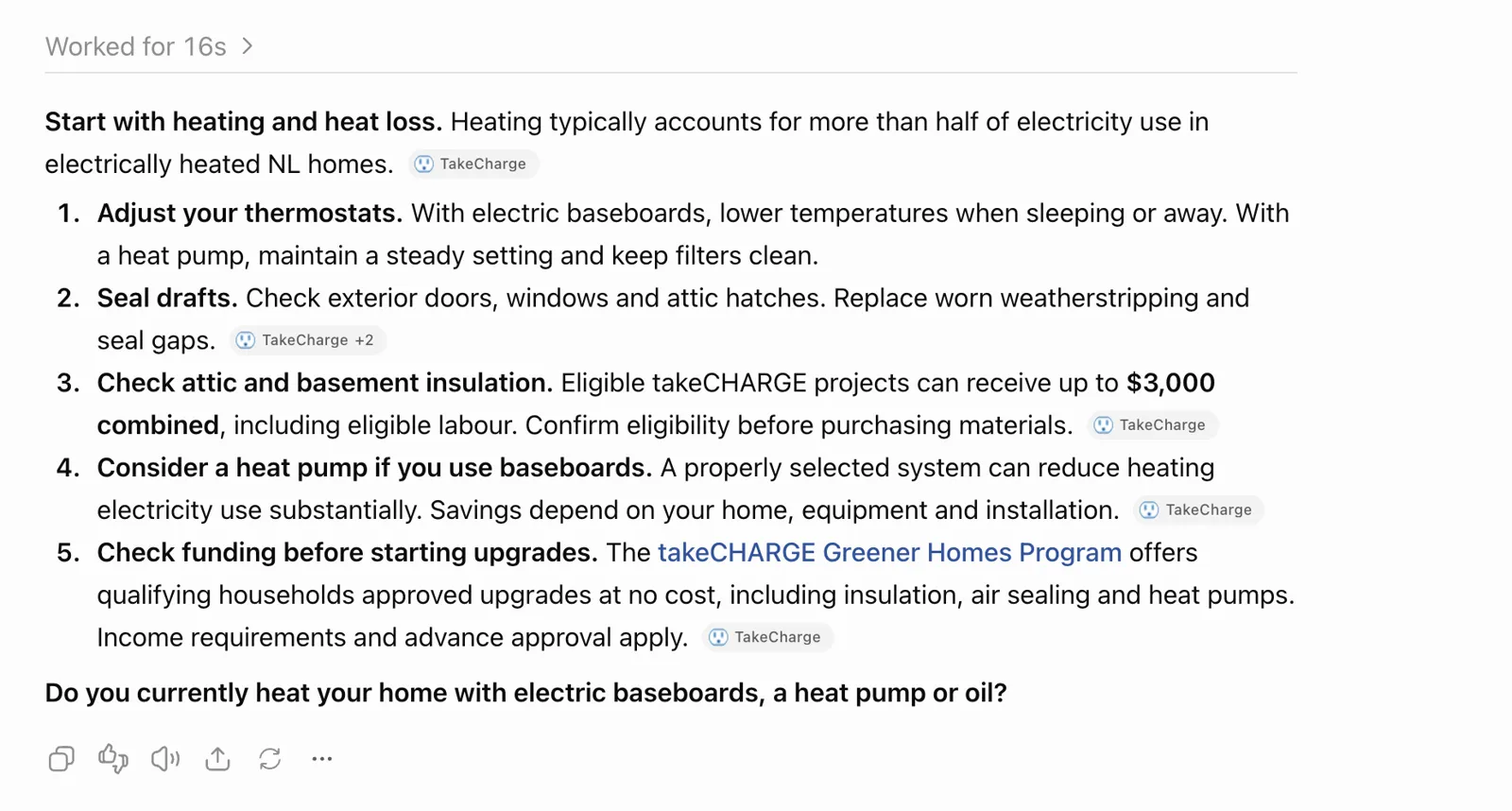
AI assistant response to a home energy savings question. TakeCharge is cited several times, including for heating, insulation and Greener Homes guidance. The answer illustrates the importance of accurate, up to date program information.
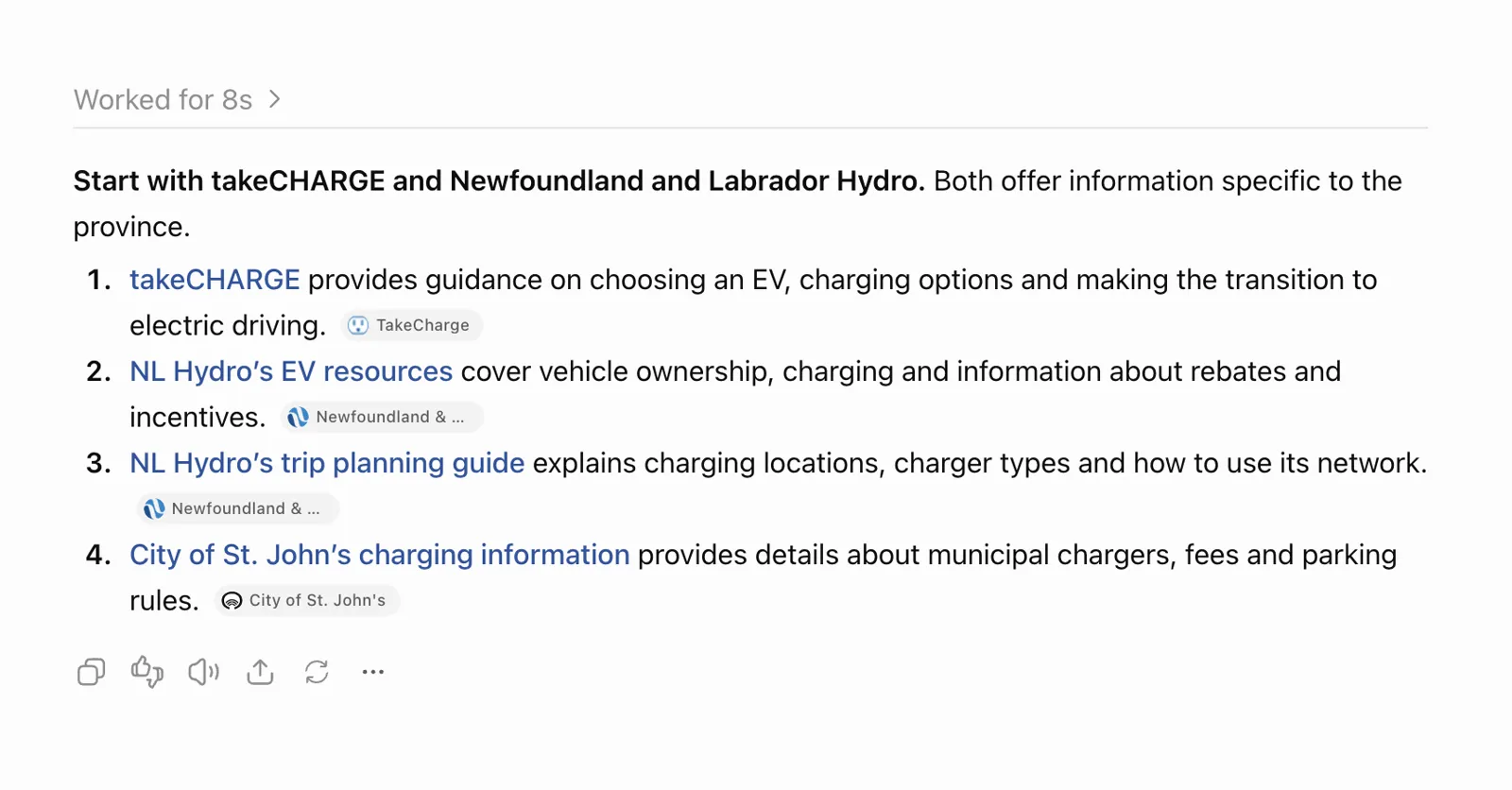
AI assistant response about electric vehicle resources in Newfoundland and Labrador. TakeCharge is mentioned alongside NL Hydro and municipal sources, showing how customers may receive a blended answer rather than a single website link.
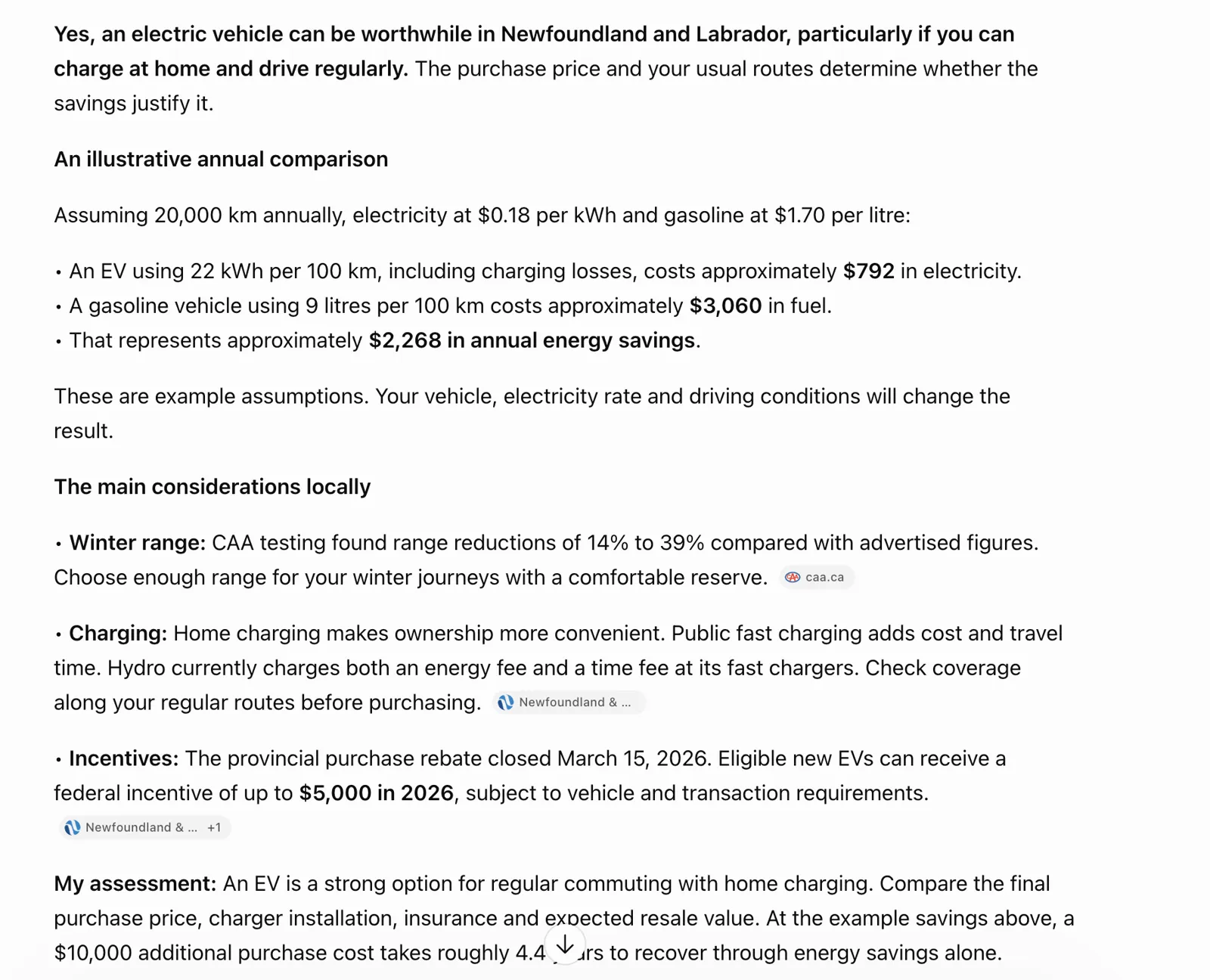
AI generated electric vehicle cost comparison. The response includes assumed fuel and electricity prices and a statement about incentive availability. These claims should be verified with program owners before being treated as current facts.
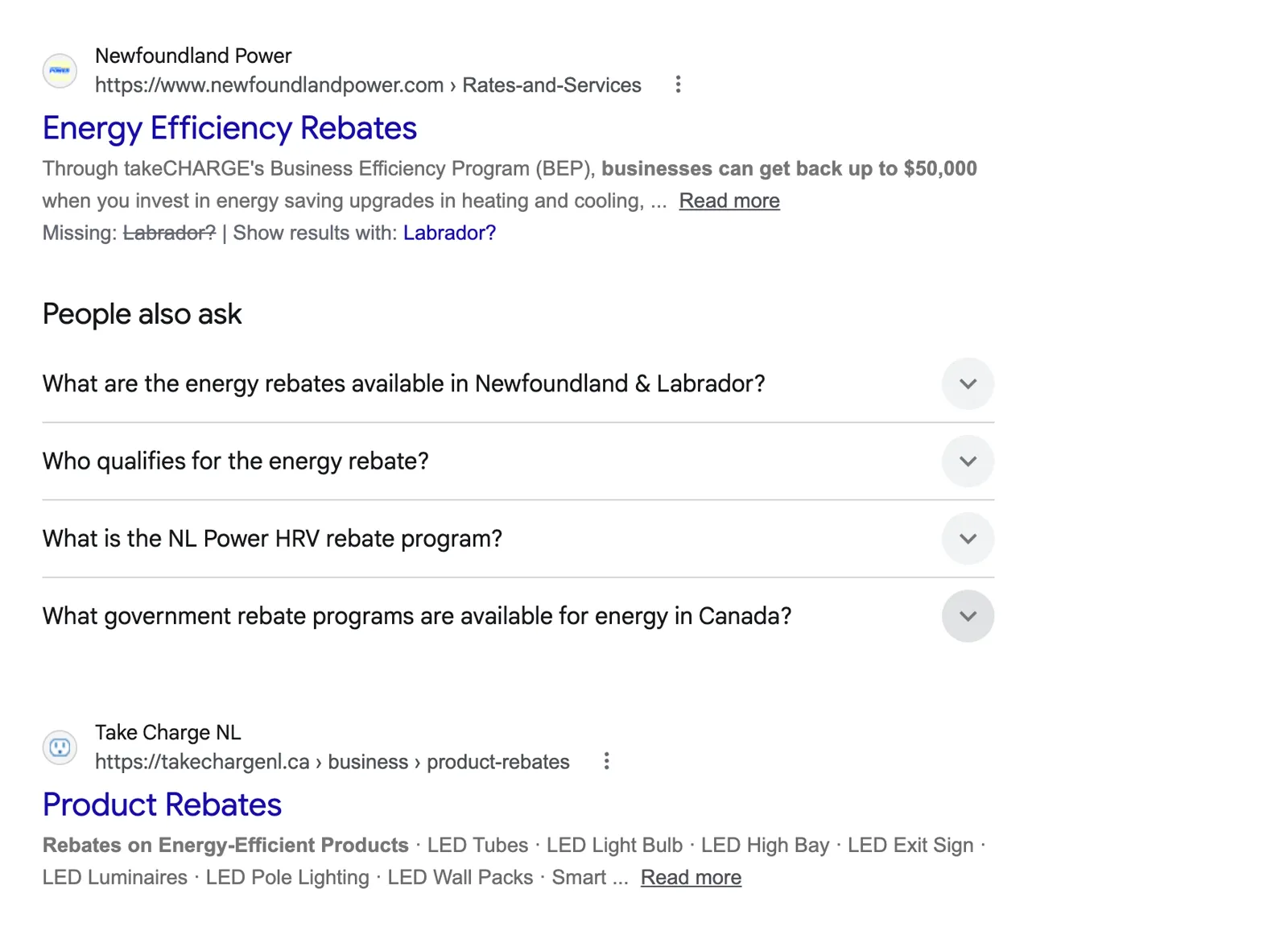
Google search results for energy efficiency rebates. Newfoundland Power and TakeCharge appear among relevant results and questions, illustrating opportunities to write clearer customer focused rebate answers.
Example 1 | Residential rebate eligibility
Customer question: “Am I eligible for an insulation rebate in Newfoundland and Labrador?”
Recommended page response: Lead with a short eligibility summary, then provide a clearly labelled checklist for eligible properties, insulation requirements, documentation, application sequence and the official program link. Confirm the current rules with the program owner before publication.
Why this helps: Customers and answer engines can find a direct, authoritative response rather than piecing together details across menus and application forms.
Example 2 | EV incentives and costs
Customer question: “What electric vehicle incentives are available in Newfoundland and Labrador, and how do I apply?”
Recommended page response: Distinguish current incentives from expired offers, identify eligibility and application steps, show a last reviewed date, and link to the relevant official program and EV cost calculator. Do not publish dollar values without current verification.
Why this helps: It reduces the risk of AI generated answers citing outdated incentive pages or historical announcements.
Example 3 | Finding a certified installer
Customer question: “Where can I find a certified heat pump installer serving the Avalon Peninsula?”
Recommended page response: Create an indexable, accessible directory introduction that explains certification categories, geographic coverage, how to search or filter providers and the nonendorsement disclaimer. Link to individual directory views without claiming any provider is preferred.
Why this helps: The current installer journey is useful, but its indexation directives and lengthy accordion lists create opportunities for better search discovery and customer usability.
Example 4 | Energy saving tips
Customer question: “What are 10 free ways to reduce my electricity bill at home?”
Recommended page response: Rebuild the existing infographic as an HTML list with one heading and a short explanation per tip. Retain the image as a supporting graphic, review numerical savings claims and show a last reviewed date.
Why this helps: Key advice becomes readable by assistive technology, conventional search and AI systems, rather than being primarily embedded in an image.
Suggested AI visibility test: Run the same 12 to 20 customer questions across Google Search (including AI Overviews where shown), ChatGPT Search and Microsoft Copilot. Record date, prompt, whether TakeChargeNL is cited, cited URL, accuracy, outdated statements and recommended correction. This is a proposed next activity, not a completed audit result.
HOW TO INTERPRET THE SCREENSHOT EVIDENCE
Screaming Frog metadata and heading screenshots: illustrate the reported 421 missing meta descriptions and 77 missing H1 entries. Some H1 results require verification in a JavaScript rendered crawl before final classification.
Screaming Frog noindex/nofollow screenshot and installer directory screenshot: together show why indexing intent should be confirmed for public installer resources, rather than treating every noindex directive as an error.
Two “10 Ways to Save Energy at Home” screenshots: show different versions of the same educational topic and demonstrate why image only guidance should be converted into accessible HTML text.
Lighthouse evidence: mobile Performance 49, Accessibility 75, Best Practices 69 and SEO 77; desktop Performance 64 and CLS 0.542. These are measured laboratory results, not field data or a guarantee of every visitor’s experience.
Structured data screenshot: confirms 54 URLs detected with structured data after extraction was enabled. It does not establish that every page has eligible rich results.
10. Visual Design & User Interface
Highlights
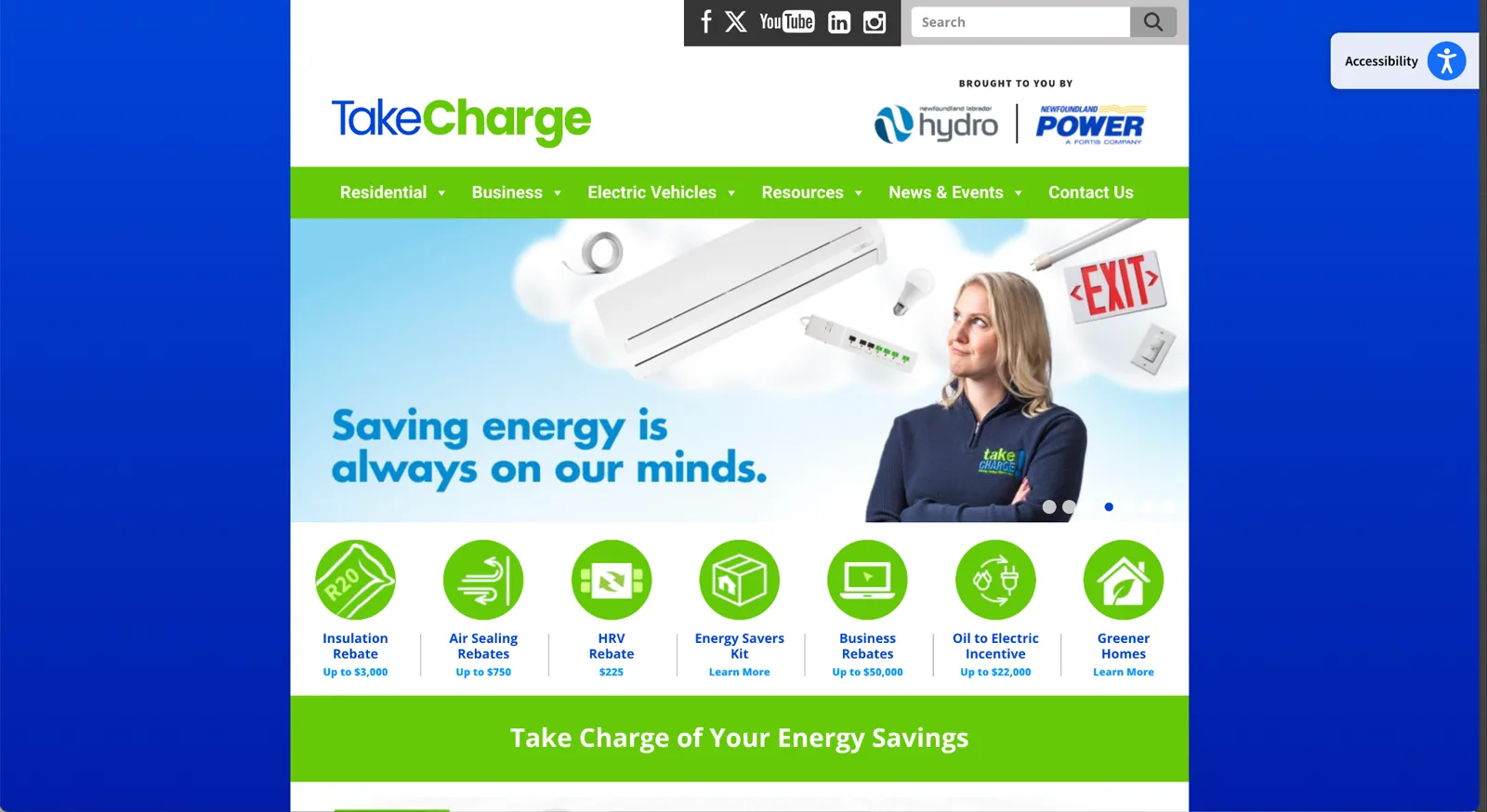
MEDIUM | The desktop homepage uses a narrow, centred content area with substantial unused space on wide displays.
MEDIUM | The large promotional slider, strong blue gradient background and dense navigation contribute to a dated visual presentation.
MEDIUM | The 7 circular rebate icons and small captions would benefit from a more consistent, contemporary icon system.
MEDIUM | Image delivery should be reviewed for appropriate SVG icons and WebP or AVIF raster assets; sitewide format usage was not established.
Why this matters
A public facing energy efficiency website must feel current, trustworthy and easy to use. The narrow desktop canvas limits the space available for clear explanations and prominent calls to action, while compact labels and dated visual treatments can make important programs harder to scan.
What the findings mean
The supplied desktop homepage screenshot shows wide blue side margins around a relatively narrow central layout, a large image slider, a horizontal row of 7 green rebate icons and compact blue captions. These are visual and usability observations, not evidence that the functions are broken. The screenshot does not independently establish the file formats used by every icon or image.
Recommended response
Modernize the existing visual system rather than assuming a full redesign is required. Test wider responsive desktop templates; improve hierarchy, typography, spacing and calls to action; introduce a consistent SVG (Scalable Vector Graphics) icon library for suitable interface graphics; and audit raster images for WebP or AVIF conversion, responsive sizing and compression. Validate any change against mobile layouts, accessibility and loading performance.
Homepage visual evidence | Desktop screenshot supplied October 27, 2026
11. Website Security & Maintenance
Highlights
HIGH | No Web Application Firewall (WAF) is reported as configured.
LOW / ONGOING | WordPress plugins were reported as updated during the audit.
MEDIUM | The active PHP version was not verified; WordPress administrator access is no longer available.
HIGH / VERIFY | Backups, restoration procedures, administrator permissions, Multi Factor Authentication (MFA), and form data safeguards have not been independently assessed.
Why this matters
The site provides public program information, rebate application paths and contact forms. Strong security and maintenance controls help protect service availability, visitor information and confidence in the program.
What the findings mean
The absence of a reported WAF is a confirmed configuration gap based on administrator information, but does not by itself demonstrate an exploitable vulnerability. Updated plugins are positive, but do not establish the security posture of WordPress core, PHP, hosting or user accounts. The PHP version and internal security controls remain unverified, and no penetration test was conducted.
Recommended response
Ask the hosting provider or website administrator to confirm the PHP version and support status, WordPress core and theme versions, patch management, WAF coverage, backup retention and restore testing, administrator access controls and MFA, security monitoring, and the protection and retention of information submitted through forms. Prioritize implementing a properly configured WAF and validating recovery procedures. Record evidence and assign ownership before treating any unverified item as a defect.
12. Accessibility Overlay | AccessiBe
Highlights
HIGH | The homepage displays an AccessiBe accessibility overlay, while Lighthouse testing identified underlying accessibility issues (score 75 on both desktop and mobile).
Why this matters
Accessibility needs to be built into the site itself. An overlay may offer visitor preferences, but it does not replace accessible markup, keyboard support, meaningful labels, sufficient contrast or testing with assistive technologies.
What the findings mean
The presence of AccessiBe does not demonstrate compliance with Web Content Accessibility Guidelines (WCAG) 2.2 Level AA. The observed Lighthouse issues should be reviewed directly in the site templates and content. This finding does not claim the overlay causes those issues.
Recommended response
Complete a formal WCAG 2.2 Level AA assessment, including manual keyboard and assistive technology checks. Fix issues in the underlying website code and content, then assess whether the overlay offers any additional value. Avoid treating an overlay as certification of accessibility compliance.
08 · Report
Prioritized Findings & Recommendations
The recommendations below consolidate the actions identified throughout the audit. High, Medium and Low describe relative priority, not a commitment to implementation timing. Proposed owners and effort are indicative and should be confirmed with Newfoundland Power.
| ID | Priority | Area / Program Area | Recommended action |
|---|---|---|---|
| P01 | High | Performance Program: All programs |
Improve mobile page loading performance. Lighthouse measured 11.5
seconds for the largest visible content element to appear on mobile.
Review image sizes and formats, fonts, scripts and stylesheets to help
important content load faster. Suggested owner: Developer Indicative effort: Medium |
| P02 | High | Performance Program: All programs |
Resolve desktop CLS of 0.542 by identifying the source of main
content movement and reserving layout space. Suggested owner: Developer Indicative effort: Medium |
| P03 | High | Accessibility Program: All programs |
Remediate unnamed controls, missing accessible names, contrast and
heading order on priority templates. Suggested owner: Developer / UX Indicative effort: Medium |
| P04 | High | Indexing Program: Installer Directories / Residential |
Verify the noindex,nofollow directives on public installer directory
pages; remove only if unintended. Suggested owner: SEO / Developer Indicative effort: Small |
| P05 | High | SEO Program: Multiple programs |
Write unique meta descriptions for high value pages; crawl reported
421 missing. Suggested owner: SEO / Content Indicative effort: Medium |
| P06 | High | SEO Program: Multiple programs |
Review 77 URLs flagged as missing H1; validate rendered pages before
template changes. Suggested owner: SEO / Developer Indicative effort: Medium |
| P07 | High | Content Program: Energy Saving Resources |
Convert key energy saving infographics into accessible, indexable
HTML explanations while retaining visuals. Suggested owner: Content / UX Indicative effort: Large |
| P08 | Medium | Technical SEO Program: Multiple programs |
Review 108 duplicate page title URLs, identify true duplicates and
consolidate or differentiate appropriately. Suggested owner: SEO / Content Indicative effort: Medium |
| P09 | Medium | Technical SEO Program: Multiple programs |
Verify 10 indexable FAQ URLs without canonical tags and add self
referencing canonicals where appropriate. Suggested owner: Developer / SEO Indicative effort: Small |
| P10 | Medium | Technical SEO Program: Multiple programs |
Investigate 11 404s and redirect chains; correct important internal
links and map valid retired URLs. Suggested owner: Developer / SEO Indicative effort: Medium |
| P11 | Medium | Content Program: Multiple programs |
Show article publication and update dates; add related content and
stronger news navigation. Suggested owner: Content / Developer Indicative effort: Medium |
| P12 | Medium | Content Program: EV |
Review historical dollar savings and EV range claims against current
approved program guidance. Suggested owner: Program / Content Indicative effort: Medium |
| P13 | Medium | UX Program: Business |
Simplify dense Business navigation and improve task oriented
pathways to rebates and program information. Suggested owner: UX / Content Indicative effort: Large |
| P14 | Medium | Performance Program: All programs |
Set suitable cache headers for versioned static assets and review
third party script and font loading. Suggested owner: Developer / Hosting Indicative effort: Medium |
| P15 | Medium | AI search Program: Multiple programs |
Build answer led program pages with clear eligibility, steps,
evidence, effective dates and official attribution. Suggested owner: Content / SEO Indicative effort: Large |
| P16 | Medium | AI search Program: Multiple programs |
Benchmark real customer questions across traditional and AI assisted
search and monitor answer accuracy. Suggested owner: SEO / Strategy Indicative effort: Medium |
| P17 | Medium | Structured data Program: Multiple programs |
Audit current schema and add only valid page appropriate types for
articles, breadcrumbs, organization and events. Suggested owner: SEO / Developer Indicative effort: Medium |
| P18 | Medium | Analytics Program: Multiple programs |
Define and validate application starts, completions, downloads and
key journey events in GA4. Suggested owner: Analytics / Developer Indicative effort: Medium |
| P19 | Medium | Accessibility Program: All programs |
Review images and embedded media for alt text, captions, iframe
titles and keyboard operation. Suggested owner: Accessibility / Developer Indicative effort: Medium |
| P20 | Low | Information architecture Program: Multiple programs |
Review numeric and duplicate URLs, obsolete campaign content and
sitemap inclusion before consolidation. Suggested owner: SEO / Content Indicative effort: Medium |
| P21 | Medium | Visual design Program: Multiple programs |
Test a wider responsive desktop layout and improve hierarchy, navigation density, icon consistency and promotional link readability. Owner: design and development. Effort: medium. |
| P22 | Medium | Image optimization Program: Multiple programs |
Audit image formats and sizes; adopt SVG for suitable icons and WebP or AVIF for appropriate raster images, with tested fallbacks. Owner: development. Effort: medium. |
| P23 | High | Security | WAF Program: Multiple programs |
Confirm hosting protections and implement or validate an appropriately configured Web Application Firewall. Owner: hosting and development. Effort: low to medium. |
| P24 | Medium | Security | PHP Program: Multiple programs |
Ask the host to verify the active PHP version, support status and compatibility before recommending an upgrade. Owner: hosting. Effort: low. |
| P25 | High | Security | controls Program: Multiple programs |
Verify backups and restore tests, MFA, administrator access, monitoring and form data safeguards; document any actual gaps. Owner: hosting and site administrator. Effort: medium. |
| P26 | High | Accessibility overlay Program: All programs |
Assess AccessiBe alongside a manual WCAG 2.2 AA audit; remediate underlying accessibility barriers rather than relying on an overlay. Owner: accessibility and development. Effort: medium. |
09 · Report
Recommendations | Proposed Timing
Quick wins | 0 to 30 days
Verify and repair critical 404s, review unintended noindex on installer directories, fix high impact accessible names and contrast failures, add priority meta descriptions, and establish performance baselines.
Medium term | 1 to 3 months
Optimize image and script delivery, improve caching and desktop CLS, revise high value content templates, simplify menu architecture, and consolidate or redirect duplicate/obsolete content.
Long term | 3 to 6 months
Modernize editorial workflows, rebuild image based tips as semantic content, implement appropriate schema, improve article discovery, and conduct moderated user testing and ongoing measurement.
DELIVERY STATUS AND REMAINING WORK
Completed to date: technical and content assessment, broad customer journey walkthroughs, Lighthouse reviews, crawl analysis and initial recommendations. Remaining steps under the proposed engagement: validate priority exceptions and analytics data, undertake comparative benchmarking, confirm priorities and dependencies with stakeholders, finalize the quick win / medium / long term roadmap, agree success measures and present the final findings. Optional user testing remains subject to agreement.
10 · Report
Evidence and Validation Principles
Evidence sources: Screaming Frog SEO Spider crawl screenshots (October 2026), Google Lighthouse mobile and desktop laboratory reports, and direct manual walkthroughs of residential, business, EV, news and resource pages. The crawl was not a full external indexation audit. No claim is made that every flagged page is defective; some results may depend on crawl settings, page templates, JavaScript rendering or intentional search directives.
Before implementation: export the final crawl datasets, validate high impact findings on live pages, confirm Search Console indexing and actual user Core Web Vitals, and reconcile recommendations with content owners.
| Area | Evidence observed | Implication |
|---|---|---|
| Mobile performance | Lighthouse performance 49; LCP 11.5 seconds; FCP 5.1 seconds | Slow initial experience on mobile devices |
| Desktop stability | Performance 64; CLS 0.542 | Significant measured layout movement |
| Accessibility | Lighthouse accessibility 75 on mobile and desktop | Barriers flagged for controls, images, contrast and touch targets |
| Search optimization | 421 indexable URLs flagged with missing meta descriptions; 108 URLs in duplicate title filter | Reduced control over search snippets and potential content overlap |
| Heading structure | 77 URLs flagged as missing H1; 2 pages with multiple H1s | Inconsistent document hierarchy requiring template review |
| Technical hygiene | 11 URLs returned 404; 10 FAQ pages flagged without canonical tags | Broken destinations and inconsistent canonical signals |
| Content experience | Some tips rely on large infographic images; news articles lack visible publication dates | Reduced text accessibility, discoverability and content context |
| Structured data | 54 URLs contain markup, mainly events and map locations | Opportunity for relevant, validated markup on other templates |
11 · Report
Phase 2 | Customer Experience & Content
The next phase is Customer Experience & Content. It builds on the technical, content and search findings documented in this assessment.
The audit will guide which customer journeys and pages receive closer attention, including rebate discovery, eligibility information, installer search, EV information and content that is difficult to find or understand.
The goal of Phase 2 is to assess how effectively the website supports customer needs and to develop evidence based recommendations for clearer navigation, stronger content and more useful customer pathways.
12 · Report
Appendix A: Technical Audit Evidence
The evidence below explains how we reached the findings in the earlier sections. It separates measured results, observed customer experience issues, and items requiring confirmation before production changes. Screenshots are from the October 27, 2026 assessment session.
A. Assessment coverage and methodology
KEY POINTS
• The review combined automated crawling, browser performance tests and direct customer journey testing.
• Results are separated into measured findings, observations and proposed follow up checks.
Methods included a Screaming Frog SEO Spider crawl, Google Lighthouse laboratory audits for mobile and desktop, review of Google Analytics 4 and organic search data, direct inspection of key content templates, and manual walkthroughs of rebate forms, navigation, calculators, interactive content and directories. No actual rebate application was submitted during testing.
| Workstream | Evidence and coverage |
|---|---|
| Crawl and indexing | Approximately 2,179 URLs discovered; 1,057 crawled; 1,121 blocked by robots.txt; 596 internal HTML URLs; 421 indexable HTML URLs. |
| SEO | Titles, descriptions, H1/H2, canonicals, robots directives, structured data, sitemap coverage and response codes. |
| Performance | Mobile and desktop Lighthouse, Core Web Vitals, network dependencies, caching and layout shift diagnostics. |
| User journeys | Residential insulation, HRV and oil to electric rebate paths; business lighting and custom solutions; EV tools; installer directories. |
| Content | Newsroom, Tips & Tools, educational graphics, program information and navigation structure. |
| Measurement | GA4 metrics attached to 494 crawled URLs in the initial analysis; subsequent token error limits repeatability until access is restored. |
B. Performance findings
KEY POINTS
• Mobile loading speed and desktop layout movement emerged as different problems.
• The findings point to specific technical investigations, not a recommendation to remove plugins without testing.
| Metric | Mobile | Desktop | Good benchmark |
|---|---|---|---|
| Performance score | 49 | 64 | 90–100 / 100 Google source ↗ |
| Accessibility score | 75 | 75 | 90–100 / 100 Google source ↗ |
| Best Practices | 69 | 69 | 90–100 / 100 Google source ↗ |
| SEO score | 77 | 77 | 90–100 / 100 Google source ↗ |
| First Contentful Paint | 5.1 s | 1.2 s | Mobile ≤1.8 s; Desktop ≤0.9 s Google source ↗ |
| Largest Contentful Paint | 11.5 s | 1.3 s | Mobile ≤2.5 s; Desktop ≤1.2 s Google source ↗ |
| Total Blocking Time | 330 ms | 0 ms | Mobile ≤200 ms; Desktop ≤150 ms Google source ↗ |
| Cumulative Layout Shift | 0.005 | 0.542 | ≤0.1 (both devices) Google source ↗ |
| Speed Index | 11.1 s | 3.6 s | Mobile ≤3.4 s; Desktop ≤1.3 s Google source ↗ |
Benchmark basis: Google Lighthouse’s good/green ranges, not industry averages. Scores are out of 100; 90–100 is good and 100 is the ideal score. Timing thresholds differ for mobile and desktop laboratory tests.
A Lighthouse accessibility score of 100 does not establish WCAG compliance; manual accessibility testing is still required. These laboratory results do not establish a real-user Core Web Vitals pass. For real-user data, good LCP is ≤2.5 s and good CLS is ≤0.1 at the 75th percentile on either device; TBT is a lab diagnostic, not a Core Web Vital. Google Core Web Vitals guidance ↗
Interpretation: mobile page loading is the more substantial speed concern, while desktop visual stability is the dominant Core Web Vitals issue. These are laboratory measurements from the reviewed runs, not proof of the experience of every visitor.
B1. Mobile loading and render blocking resources
Why it matters: Mobile visitors may abandon a page before the main information appears. Scripts and styles that delay rendering can affect even pages whose underlying server is functioning.
Lighthouse reported estimated render blocking savings of 3,890 ms, unused JavaScript of approximately 599 KiB, unused CSS of 99 KiB and a network payload around 3,741 KiB. The critical request chain reached approximately 4,142 ms. Multiple third party and first party font, style and script requests contribute to loading complexity. Savings estimates are diagnostic and should not be added together.
• Audit CSS and JavaScript by template; remove only verified unused assets and defer noncritical scripts without breaking forms, navigation or calculators.
• Optimize above the fold imagery, use appropriate dimensions and modern compression, and review font families, weights and display strategy.
• Retest on representative homepage, rebate, article, EV and directory templates after each optimization batch.
B2. Browser caching and server response
Why it matters: Returning visitors should not have to download unchanged files repeatedly. Sensible caching reduces data transfer and repeat load times without preventing timely content updates.
Lighthouse identified approximately 1,984 KiB in potential cache lifetime opportunities. First party examples with no cache TTL included bg-grad-new.jpg (414 KiB), EEM-Button-Banner.jpg (82 KiB), custom.js (62 KiB) and style.css (45 KiB). Document request latency was approximately 779 ms in the inspected run, with no redirect and text compression present.
• Set suitable Cache-Control policies for versioned static assets and preserve rapid invalidation for frequently changing resources.
• Review server response times alongside CDN behavior and application cache; do not interpret a single lab run as a sustained outage or server failure.
B3. Desktop layout stability
Why it matters: Unexpected movement can shift a button or link just as someone tries to select it. The flagged main content area is where movement was measured, not necessarily the underlying cause.
Desktop CLS was 0.542, above the recommended good threshold of 0.1. Lighthouse identified div#main as an element moving in two major shifts, scored 0.356 and 0.184. This identifies what moved, not necessarily what caused it. Header, navigation, banners, images and web font loading warrant inspection.
• Reserve layout space for banners and media, stabilize header height and test late loading font and plugin behavior.
• Use DevTools Performance layout shift visualization to establish the initiating element before applying a targeted fix.
C. Technical SEO and discoverability
KEY POINTS
• Metadata, heading structure and duplicate content present practical opportunities for improvement.
• Indexing instructions and blocked media need to be checked against the website owner’s intent.
C1. Titles, descriptions and headings
Why it matters: Search results and page headings set expectations. Distinct, descriptive labels help both search engines and customers understand what each page offers.
The reviewed Page Titles > Missing filter contained no entries. The Duplicate title filter returned 108 URLs, including similar or repeated content such as “10 Ways to Save Energy at Home” and multiple historic “Ditch the Dial” entries. Some apparent duplicates differ only in capitalization; others may be distinct but overlapping pages. Canonical and content decisions require page level review.
The Meta Description > Missing filter returned 421 URLs, including the homepage and important program pages. This deserves attention, especially on high traffic program pages. A meta description is not a direct Google ranking factor, but well written descriptions can influence how search snippets are presented and improve relevance to users.
The H1 > Missing filter returned 77 URLs; examples included EV incentive pages, the home heat loss estimator, charger station finder, schools and several EV tools. The H1 > Multiple filter returned two URLs: the events page and the myth buster page. Confirm the rendered DOM before treating each flag as a defect.
Recommended sequence: prioritize the homepage and high value rebate, program, EV and resource pages; write distinctive titles and descriptions; ensure a clear H1 for each content template; validate heading hierarchy and accessible names separately.
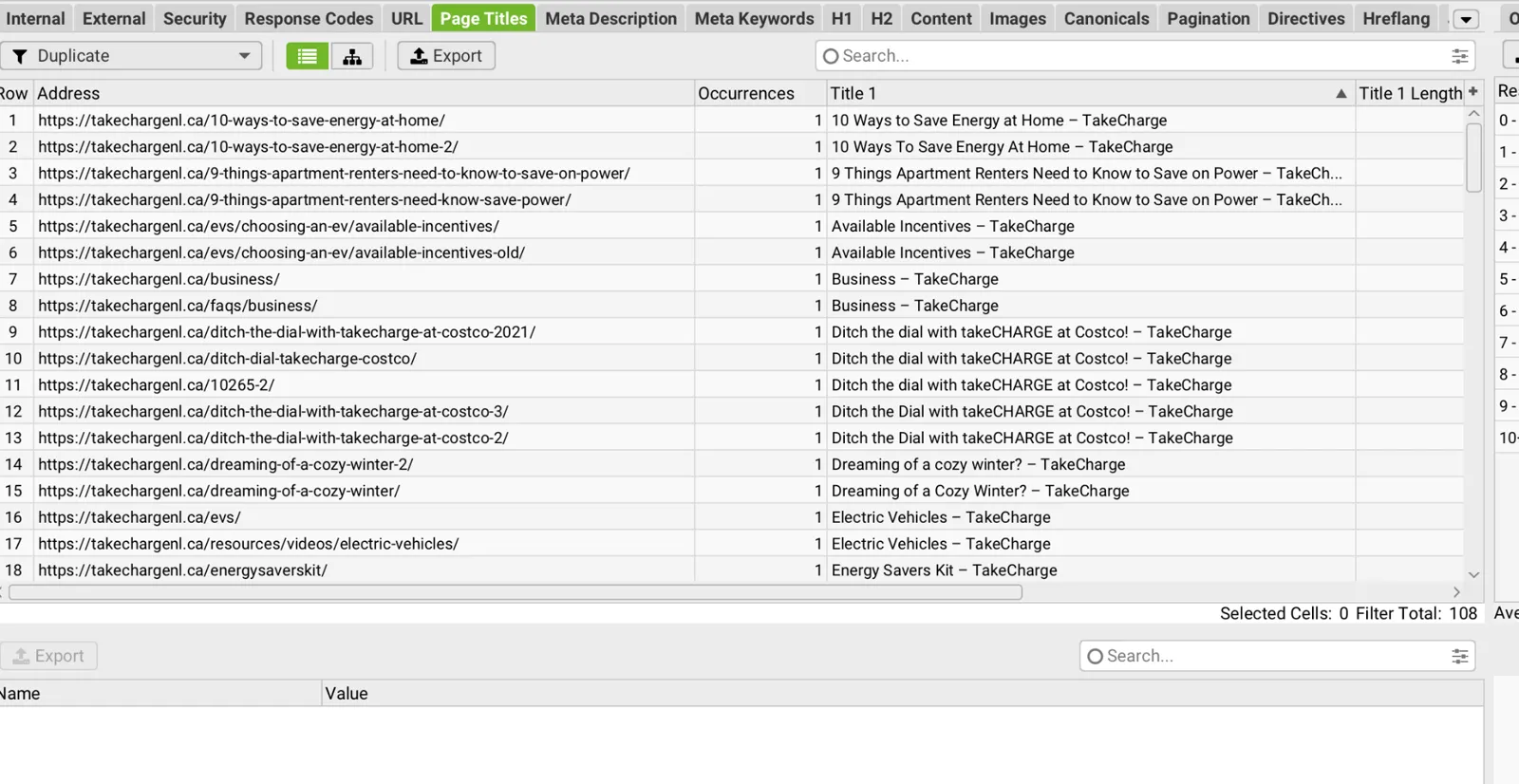
Figure: Screaming Frog review of page level metadata and heading patterns.
C2. Canonical and robots directives
Why it matters: A useful page that is intentionally or accidentally excluded from search cannot serve people discovering it through Google. Any change must account for the page’s intended role.
Ten indexable FAQ pages were flagged as missing canonical elements, including /faq/, /faqs/business/, /faqs/lighting/, /faqs/heating/ and /faqs/rebates/. Self referencing canonical tags can clarify preferred URLs, particularly where parameterized or near duplicate variants exist. Missing canonicals alone do not mean Google cannot index a page.
Four public URLs were shown with noindex,nofollow, including /find-a-certified-installer/ and /find-a-certified-installer-tcghp/. Both installer directory pages were manually observed to present substantive customer content. Confirm whether their exclusion is deliberate before changing directives. The oil to electric travel subsidy form and a historical thermostat promotion were also flagged and may be intentionally excluded.
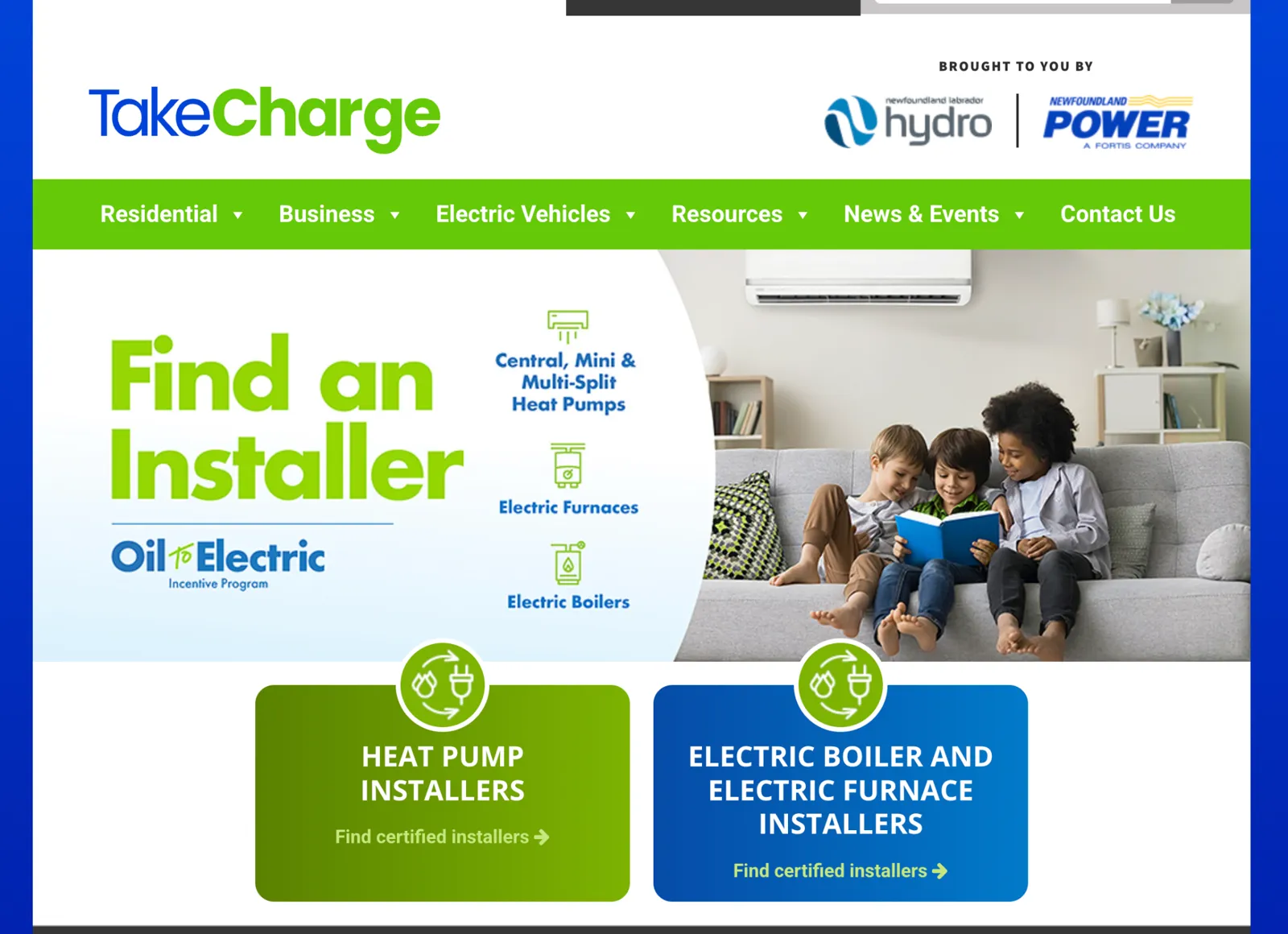
Figure: Installer directory landing page used to assess whether noindex directives match the intended search strategy.
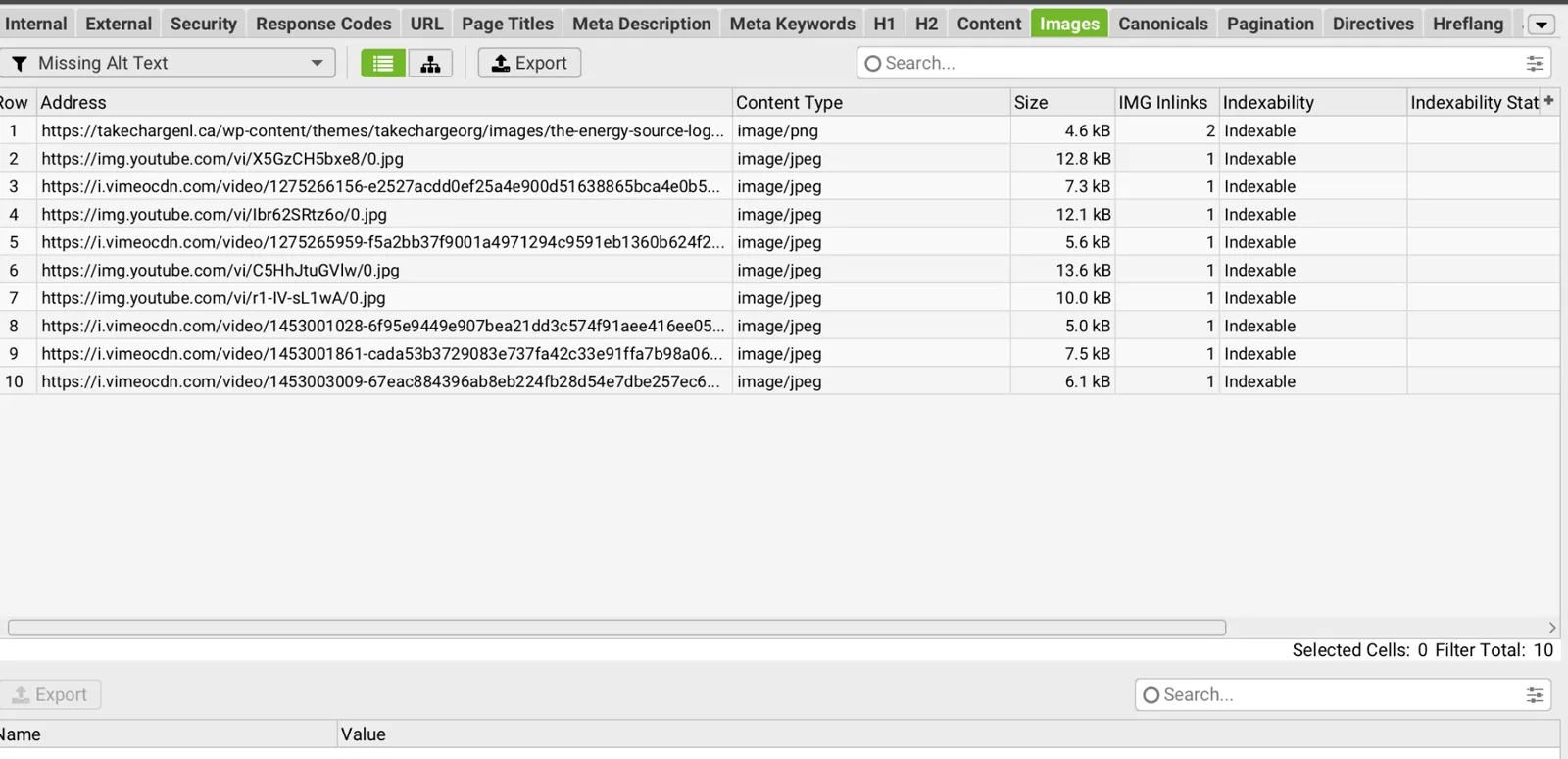
Figure: Screaming Frog directives review showing URLs marked noindex/nofollow.
C3. Redirects, 404s and URL organization
Why it matters: Broken destinations interrupt journeys and waste opportunities from external links. Clear URLs support maintenance, but changing them without redirects can damage existing links and search visibility.
The crawl recorded 63 redirects and 11 404 responses among the reviewed internal resources. Export affected source links and destination URLs, confirm live status and repair broken internal links before treating the count as a persistent production issue. Avoid blanket redirects to the homepage.
News and article URLs use mixed naming conventions, including numeric slugs such as /117619-2/ and root level article slugs. A consistent /news/ structure could improve editorial organization and user understanding, but moving articles into that directory does not inherently improve Google discovery. Any restructuring must preserve equity with one to one 301 redirects, canonical review, internal link updates and sitemap maintenance.
C4. XML sitemap and robots coverage
Why it matters: Sitemaps and crawling rules help search engines find content efficiently. Blocking assets can complicate diagnostics, but not every blocked image or PDF represents an indexing problem.
The crawl discovered approximately 1,121 URLs blocked by robots.txt, many under /wp-content/uploads/. This prevents Screaming Frog from fetching those resources in the current configuration and does not establish that the HTML pages containing them are blocked from Google. The sitemap review showed many URL entries, including old content variants with modification dates extending to 2015. An old lastmod value does not alone prove content is stale.
• Confirm sitemap entries contain canonical, indexable 200 status pages and exclude redirects, error pages and intentionally noindexed content.
• Investigate duplicate or legacy article entries and validate the actual content before consolidation or removal.
• Review whether blocking uploads is intentional and whether it creates any unintended consequences for image or PDF discovery.
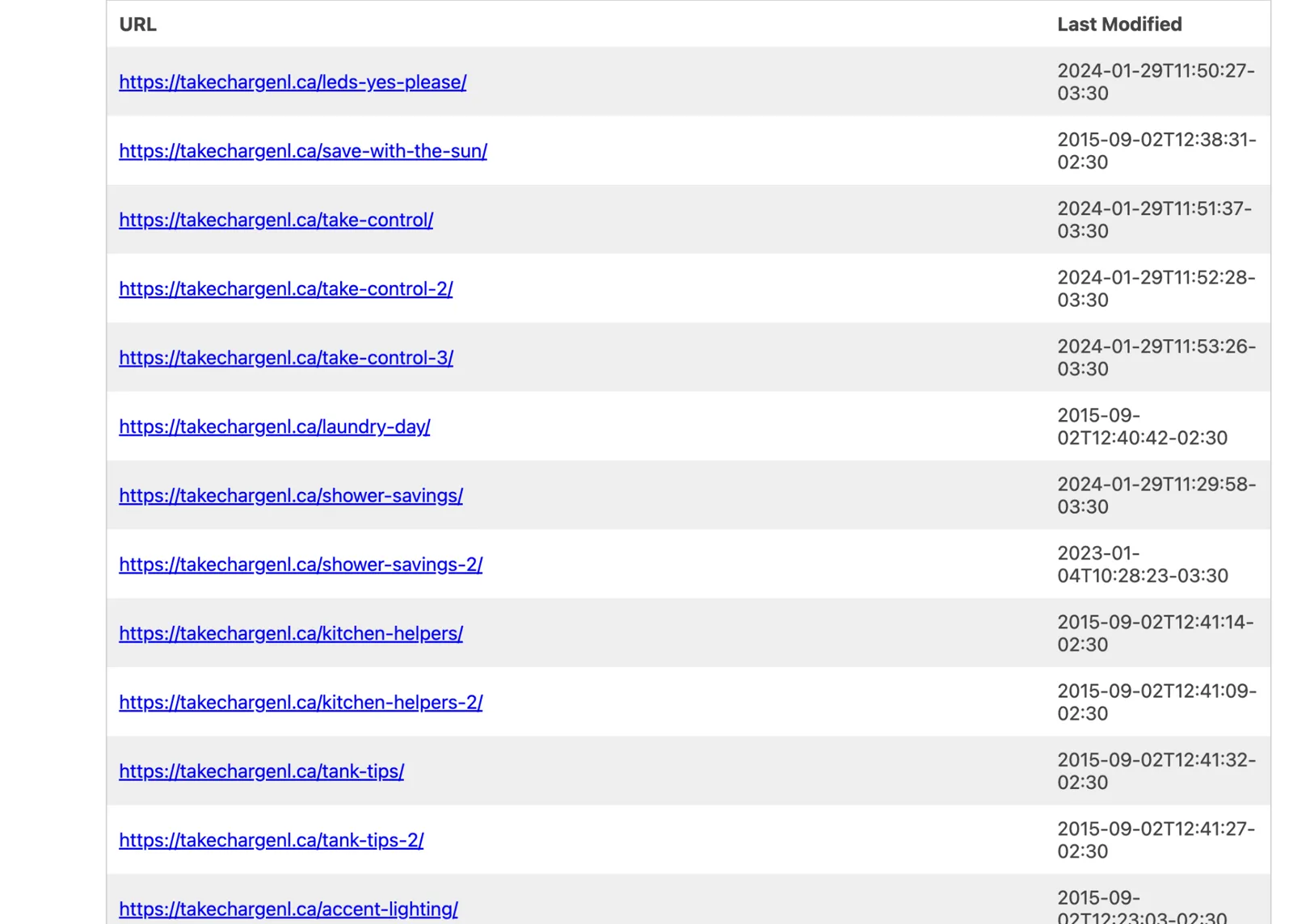
Figure: Sitemap review showing historical URL entries and last modified timestamps.
C5. Structured data
Why it matters: Accurate structured data helps describe content consistently, but it does not guarantee a special search appearance or AI citation.
After enabling structured data extraction and rerunning the crawl, 54 URLs were shown as containing structured data. Visible examples were events and map location URLs. The inspected rows displayed zero errors and warnings, but this is not proof that every page is eligible for rich results or that all relevant schema types are implemented.
• Validate relevant page types with Google Rich Results Test and Schema.org validators.
• Consider appropriate Organization, BreadcrumbList, Article, Event and FAQ structured data only where content and Google eligibility requirements support it.
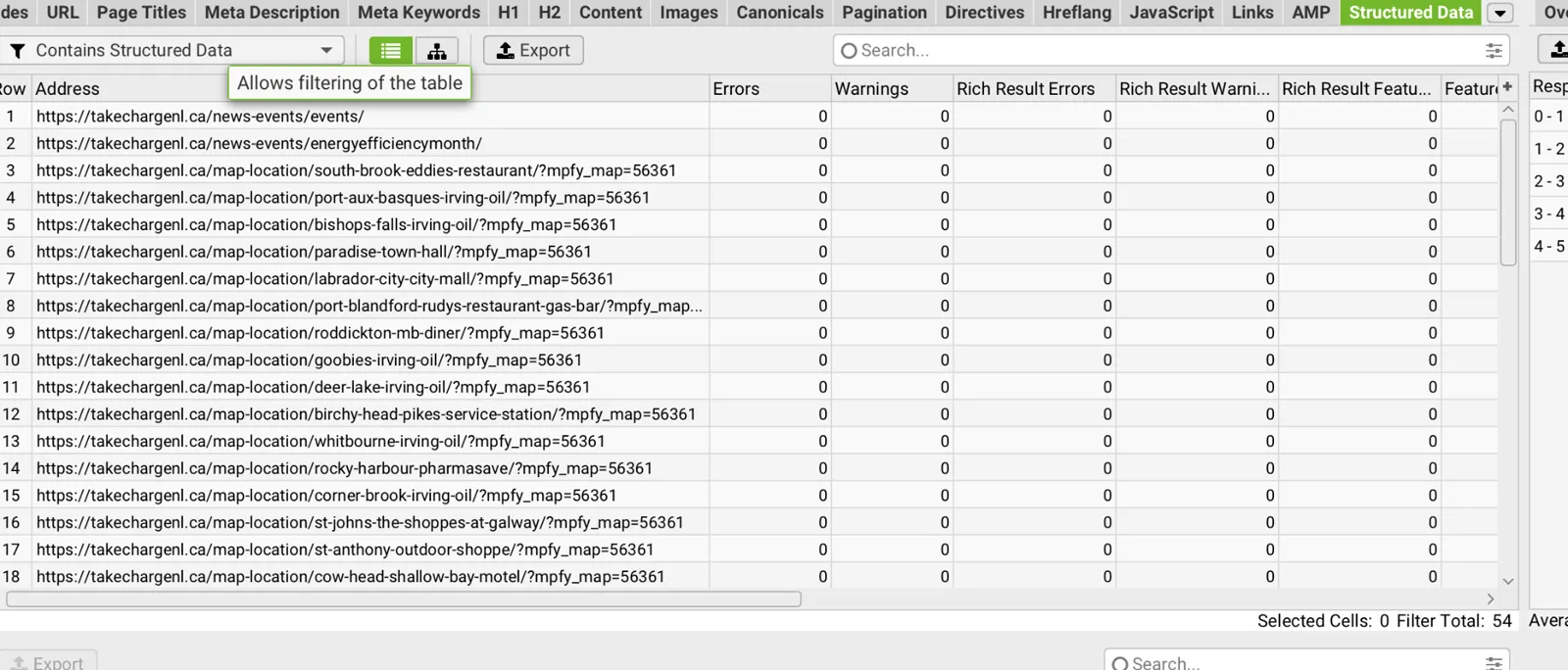
Figure: Structured data extraction review after the crawl configuration was corrected.
D. Content quality, editorial structure and search usefulness
KEY POINTS
• Image led educational content is harder to read, update and reuse in search answers.
• News and historical program information would benefit from clearer dates and content ownership.
D1. Educational tips presented as images
Why it matters: Important advice locked in an image is less usable for screen readers, text resizing, copying, translation and search indexing.
Several “Tips & Tools” pages communicate the main advice through large infographic images rather than equivalent semantic page content. The reviewed “10 Ways to Save Energy at Home” variants illustrate this pattern. The information is visually engaging but difficult to search, copy, resize or access with assistive technology if the text is not separately available.
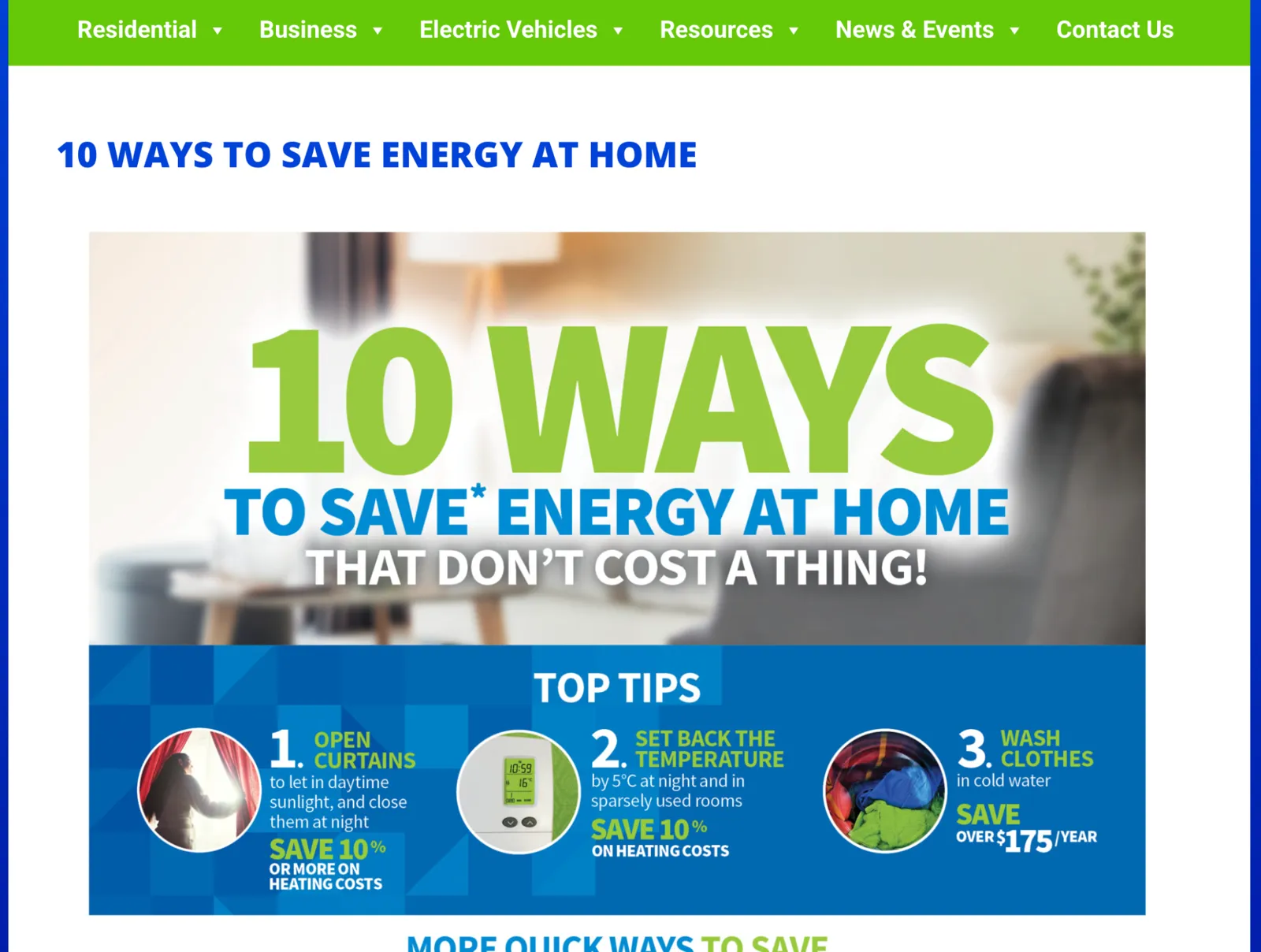
Figure: Earlier “10 Ways to Save Energy at Home” infographic as presented on the page.
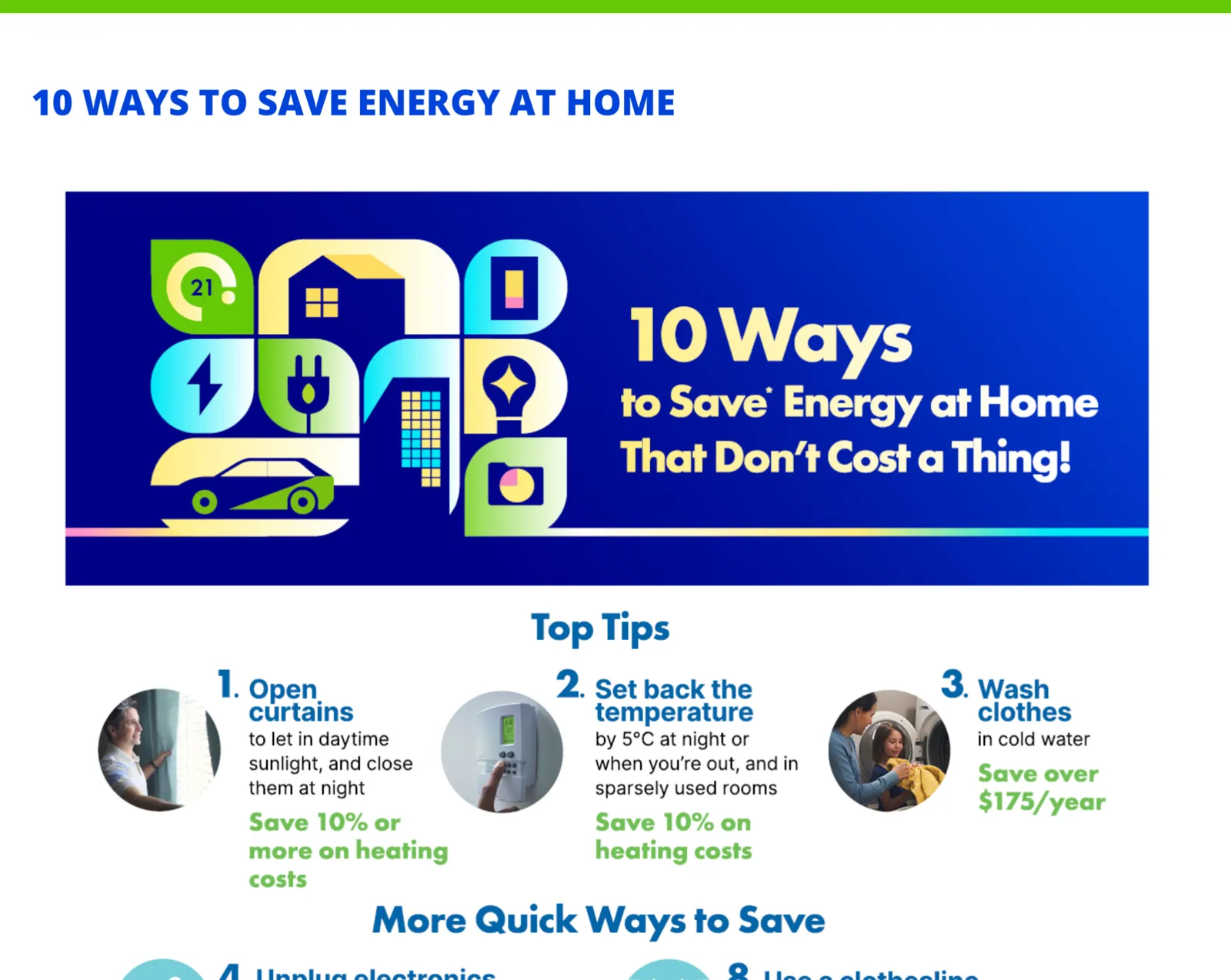
Figure: Alternative version of the same topic, illustrating duplication and image dependent information delivery.
• Rebuild the tips as real HTML headings, paragraphs and lists; keep the graphic as supporting media with appropriate alt text or an adjacent text equivalent.
• Consolidate competing versions only after checking accuracy, traffic, backlinks and program ownership.
D2. Newsroom and article engagement
Why it matters: Dates and related links help readers judge relevance and discover more content without repeatedly returning to the news index.
The Newsroom listing displays publication dates, but inspected individual article pages did not visibly show a publication date. The article template also lacked obvious related stories or next article navigation, requiring users to return to the listing. Sharing controls were not apparent on the inspected pages. These are opportunities to improve context, trust and onward discovery rather than evidence that sharing is impossible.
• Add visible publication and update dates where editorially appropriate, with corresponding Article schema where valid.
• Provide relevant related stories and clear paths back to news categories and program pages.
• Create an editorial governance process for historic announcements, campaign pages and archived promotions.
D3. Factual review of energy savings claims
Why it matters: Savings vary by energy rates, household behavior and equipment. Figures without context or a review date can create unrealistic expectations.
Some pages use quantitative examples such as savings of over $175 per year for cold water laundry, approximately $245 in annual hot water costs and EV range comparisons. These values were observed, not independently recalculated. Energy prices, vehicle capabilities and program terms change over time, so claims should be checked against current approved assumptions and source dates.
• Add a scheduled content review cycle, owner and last reviewed field for savings, rebates, eligibility and energy cost estimates.
• Include calculation assumptions and source references on pages that make material dollar or percentage savings claims.
E. Customer journeys and functional testing
KEY POINTS
• Rebate and calculator journeys were tested without completing real customer submissions.
• The primary opportunities are simpler discovery, clearer navigation and easier installer selection.
| Journey or component | Observed result | Follow up |
|---|---|---|
| Residential insulation rebate | Application path and field validation exercised; no final submission | Confirm analytics events and completion metrics. |
| Residential HRV and existing homes | Program pages and application flow reviewed | Simplify eligibility and requirements where possible. |
| Business lighting rebate | Rebate information and application steps reviewed | Improve discovery through large Business menu. |
| Business Custom Solutions | Information and form pathway tested | Review guidance and progress cues. |
| EV education and tools | Tabs, accordions and calculators exercised successfully | Review freshness of EV examples and model data. |
| Installer directories | Regional accordions and listings displayed | Confirm intended indexing and improve search/filtering. |
| Contact form | User confirmed the form worked | Track submissions and provide clear service routing. |
| News and Tips & Tools | Content accessible, but weak onward navigation and image based articles | Rework article template and semantic content. |
E1. Navigation and information architecture
Why it matters: A menu can technically function yet still require too much effort to interpret. Clear grouping reduces the number of decisions before customers reach a useful page.
The site has broad primary navigation across Residential, Business, Electric Vehicles, Resources, News & Events and Contact Us. The Business mega menu presents numerous individual links, which can increase scanning effort and make it harder to identify the right rebate or business type. During testing, menu interactions worked; the issue is information density and discoverability rather than a confirmed functional failure.
• Group content by customer intent: find a rebate, improve a building, calculate savings, find an installer and apply.
• Use short descriptive category labels, landing pages and prominent primary calls to action instead of exposing every child page in the global menu.
• Validate revised navigation with representative residential and business users before implementation.
E2. Installer directory usability
Why it matters: A long unfiltered list forces customers to scan many entries when they may need only a nearby installer certified for a particular product.
The installer pathway first separates heat pump and electric boiler/furnace categories, then presents regional accordions and long company listings. The directory includes company names, installer names, areas served, certifications and telephone numbers. The information is valuable, but long lists and multi step discovery may be difficult on mobile.
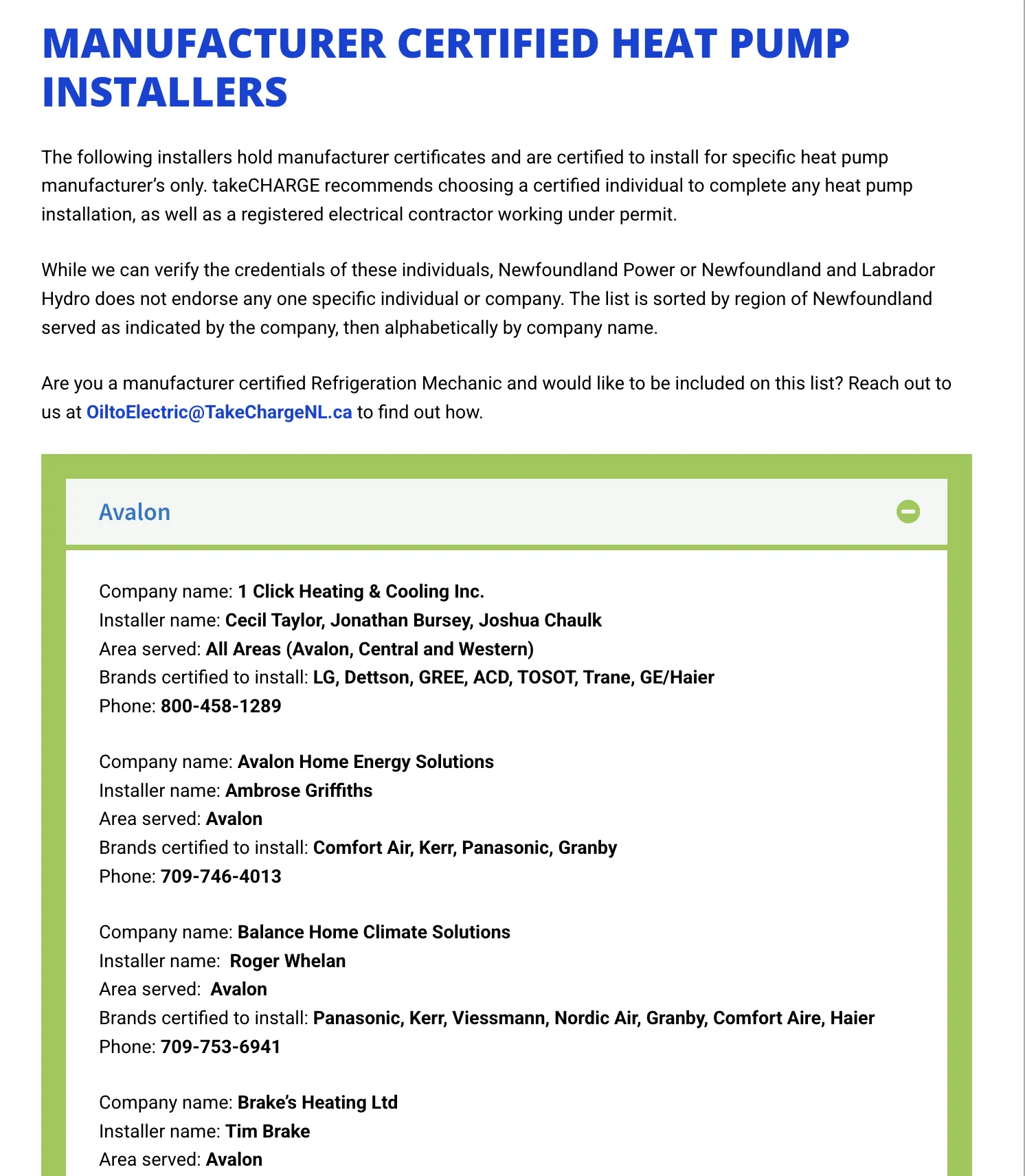
Figure: Regional installer directory showing company, area, brand certification and contact details.
• Consider filters for region, equipment category and brand, plus direct phone actions and clear contact instructions.
• Ensure the disclaimer and certification criteria remain prominent; do not imply endorsement where the site explicitly disclaims it.
F. Accessibility and inclusive design
KEY POINTS
• Automated testing found potential barriers on both desktop and mobile.
• Manual checks are needed to confirm the user impact and appropriate fixes.
Lighthouse scored accessibility 75 on both mobile and desktop. Reported concerns included buttons or links without accessible names, missing image alt text, iframes without titles, insufficient contrast, small touch targets and heading order. Automated testing identifies candidates, not a complete WCAG 2.2 AA conformance determination.
The Screaming Frog Images > Missing Alt Text filter showed 10 image URLs in the reviewed image subset, mostly YouTube/Vimeo thumbnails and one theme image. Because robots.txt blocked many uploaded images, this count is not a complete inventory. Lighthouse findings indicate the need for direct rendered page testing.
• Perform keyboard only and screen reader checks on top traffic pages, menu, rebate applications, calculators, accordions and directory components.
• Prioritize accessible names, focus states, contrast, touch targets, form errors and equivalent text for infographics.
• Document each verified issue with WCAG criterion, page template, reproduction steps and remediation acceptance test.
G. Analytics, measurement and conversion tracking
KEY POINTS
• The analytics integration worked initially but subsequently required reconnection.
• A measurement plan should focus on customer tasks and completed program actions.
The audit used GA4 integrated into Screaming Frog, attaching analytics data to 494 URLs in the initial review. A subsequent connection attempt returned an invalid access token error. The resulting interruption is a tooling authorization issue, not proof that GA4 on the public site is broken.
The most useful measures are customer actions, not just pageviews. Suggested events include rebate program selection, eligibility checks, application start, validation error, application completion, calculator engagement, installer phone click, contact submission and newsletter signup. Confirm event availability and privacy requirements before implementing.
| Measurement area | Suggested KPI | Use |
|---|---|---|
| Findability | Organic impressions, clicks, CTR and ranking by program page | Identify content opportunities. |
| Engagement | Scroll and tool engagement, navigation path | Detect confusion and weak content. |
| Conversion | Application starts and successful completions | Assess program participation funnel. |
| Technical quality | Field LCP, CLS, INP by template/device | Track real user experience. |
| Accessibility | Verified defects resolved and regression checks | Demonstrate inclusive service improvement. |
H. Prioritization matrix and effort guidance
KEY POINTS
• Immediate fixes should address customer access, search visibility and technical performance.
• Effort bands are estimates until the website team confirms scope and dependencies.
The effort bands below are planning estimates, not fixed development quotes. Confirm ownership, platform dependencies and acceptance criteria with the website team before scheduling.
| Priority | Action | Indicative effort | Measure of success |
|---|---|---|---|
| High | Investigate noindex on installer directories | Low | Intent confirmed; indexing policy corrected if needed. |
| High | Improve mobile page loading speed and caching | Medium | Help the main content appear sooner on mobile devices. |
| High | Resolve desktop CLS root cause | Medium | CLS below 0.1 in repeat tests. |
| High | Remediate verified accessibility failures | Medium to high | Priority WCAG issues closed and retested. |
| High | Repair confirmed 404 internal links | Low | No broken high value internal links. |
| Medium | Write high value meta descriptions | Low to medium | Coverage across priority landing pages. |
| Medium | Consolidate duplicate article variants | Medium | Canonical content and redirects verified. |
| Medium | Simplify Business navigation | Medium | Improved task success in user testing. |
| Medium | Convert image based tips to HTML | Medium to high | Readable, accessible, searchable tips. |
| Medium | Enhance article templates | Medium | Visible dates and improved onward journeys. |
| Planned | Structured data and editorial governance | Medium | Valid schema and regular review cadence. |
| Planned | Improve conversion event measurement | Medium | Reliable application funnel reporting. |
J. Evidence register and interpretation notes
KEY POINTS
• Screenshots document the state observed during this audit, not a guarantee of current behaviour.
• Automated findings require targeted confirmation before implementation.
The screenshots in this report are samples from the audit session. Complete raw crawl exports, Lighthouse reports, GA4 and Search Console exports should be retained as working evidence. The numeric findings represent the particular crawl configuration and laboratory runs used; they should not be extrapolated to untested URLs or interpreted as confirmed organic search penalties.
Specific cautions: robots.txt blocked uploads limit image inventory completeness; the original structured data extraction was disabled until a rerun; missing canonical tags do not guarantee indexing problems; Lighthouse flags require manual accessibility verification; the later GA4 token error is an authorization issue; and changes to historic URLs require redirect and traffic impact review.